
Agent Experience: Designing for Users Who Delegate


UID University 365 Institute of Design
Series UID UX/UI Series
Duration 25 minutes
Digital Design, UX/UI, Visual Communication, Motion Graphics, Creative Technology

UNOP Sound (University 365 Neuroscience Oriented Pedagogy)
Take five minutes to prepare your brain. Play the isochronous tone track (40Hz gamma frequency) with your eyes closed. Gamma-frequency tones before a learning session raise attention and make the material easier to absorb.
[Audio player: UNOP Pre-Lecture Isochrone (40Hz, 5 minutes)]
In this Lecture


Agent Experience: Designing for Users Who Delegate
The Click Was the Unit of Work
A product manager opens a chat panel at 8:40 on a Monday, types one paragraph about a competitor analysis she needs by Thursday, checks the scope line the interface offers her, and closes the laptop. She has not clicked a menu. She has handed over a task and walked away.
That small scene is why this lecture exists. For thirty years, interface design optimised the click. We measured how far a pointer travels, how many steps a form takes, how quickly a person finds a button. Those measurements still matter, but they describe a world where the human did the work and the software held the tools. In an agent interface, the human describes an outcome and the software does the work.
The word agent has been stretched until it means everything. Nielsen Norman Group offers a definition that survives contact with real products: an AI agent is a system that pursues a goal by iteratively taking actions, evaluating progress, and deciding its own next steps (NN/g, April 2026). Read that as a design brief. There is a goal, so the interface must capture intent. There are actions, so it must constrain scope. There are decisions, so it must expose judgement. There is progress, so it must report state. Remove any of the four and you have a chat box pretending to be a colleague.
One warning before we start. Delegation is not abdication. University 365's CI-First approach, which builds on Ethan Mollick's Co-Intelligence (2024), keeps human intelligence as the ruler and orchestrator and treats AI as a multiplier: CI = HI + (AI × HI). The canon is explicit that when a person delegates the thinking as well as the typing, the human term shrinks and the total falls even if the model gets stronger. An interface that removes judgement to save a click is not a better interface. It is a slower way of making the user less capable.

Agent Experience: Designing for Users Who Delegate
What Changes When the User Delegates
Four things change at once, and each one moves a design responsibility.
The unit of intent becomes an outcome. In a conventional interface the user's intent is the action itself: press send, apply the filter, move the file. In an agent interface the intent is a result the system has to decompose. "Renew the subscription before it lapses" contains decisions the user never made explicitly: which card, which date, what to do if the price changed, whether to tell finance. Each of those is now a design surface, and if you do not design it, the model decides it for you.
The user's attention moves above the loop. They no longer perform each step. They supervise a process that runs without them. Supervision needs a summary at the right altitude, a way to drop into detail on demand, and a clear signal when judgement is genuinely required.
The dominant failure changes. Classic interfaces fail by obstruction, when the user cannot find the control. Agent interfaces fail by inattention, when the work happened and the user did not notice what it did. Obstruction is visible and self-correcting. Inattention is quiet.
The evidence changes shape. A confirmation dialog proves an action is about to happen. It does not prove what happened afterwards. Delegation needs a record, not a dialogue.
Those shifts create three artifacts every agent interface has to design: the brief, the plan and the receipt. The brief is what the user hands over. The plan is what the system proposes to do with it. The receipt is what comes back as proof. Most products ship one of the three, usually the plan, and improvise the other two inside a chat transcript. The cost of a mistake also stops being local: a mis-clicked filter costs one correction, while a mis-scoped agent can send the wrong document to four hundred people.

Agent Experience: Designing for Users Who Delegate
The Delegation Contract: Intent, Scope, Consent
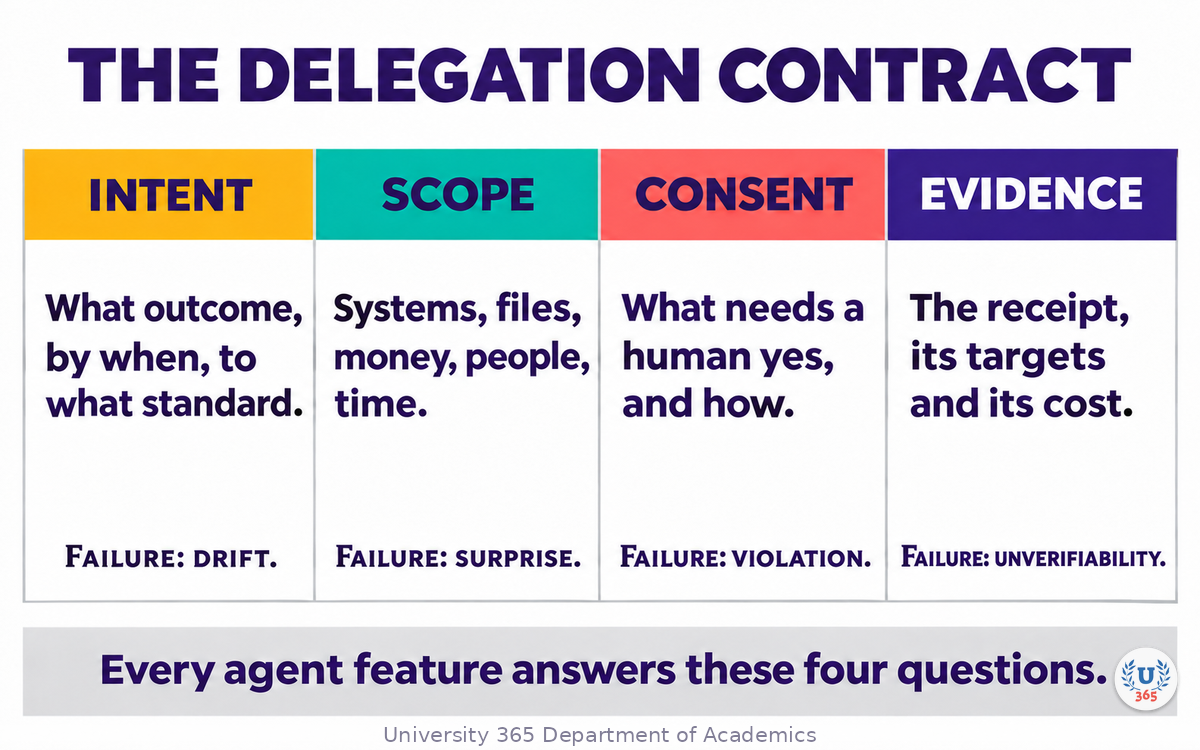
Every agent feature can be described in four fields. If it cannot, it is not ready for users.
Intent answers what outcome, by when, to what standard. It is the brief in compressed form and must be readable back in the user's own words.
Scope answers what the agent may touch: systems, accounts, files, money, people and time. Scope is a list, not a feeling, and the user must read it before the first action.
Consent answers what requires a human yes, how that yes is given, and what happens when no answer arrives. Consent is a rule set, not a button that appears whenever the system feels uncertain.
Evidence answers what comes back as proof, where it lives, and for how long. Evidence is the receipt, and it separates a product a team can audit from one a team has to trust.
The four fields predict failure classes, which is why they earn a place in a design review. Miss intent and you get drift: busy, plausible work on the wrong goal. Miss scope and you get surprise: the agent books the room and invites the client because nobody said the calendar was read-only. Miss consent and you get violation: an action the user would have refused had they been asked. Miss evidence and you get unverifiability: nobody can say what happened, so nobody can fix, price or defend it.
A practical test: write one sentence per field, in the user's language, without jargon. If the consent sentence is vague, you do not have a consent model. "The user approves important actions" says nothing. "The agent may email colleagues without asking and must ask before emailing anyone outside the company" is a rule you can build and test.
Then run the scope test. After a two-minute demo, ask a user what the agent is allowed to do. If their answer is broader than the real scope, your interface overstated it. If it is narrower, you hid capability the user paid for.

Agent Experience: Designing for Users Who Delegate
Designing the Brief: How Someone Hands Over a Task
The brief is the main input control of an agent interface, and most products treat it as a text area. That is the equivalent of designing a form as a blank sheet of paper and hoping the user guesses the fields.
A brief that survives real work carries five slots. Who: the user, the beneficiary, the audience who will read the output. What: the outcome in one sentence, plus the standard of done. Where: the systems, accounts, folders and places involved. How far: money, time and volume limits. What not: exclusions, tone constraints, people to leave out, things not to touch.
Compare two briefs for one task. "Summarise the customer feedback" produces a summary of something, at some length, for someone. "Summarise last month's support tickets for the product team, group by theme, quote three examples per theme, keep it under 800 words, exclude billing complaints, deliver as a doc in the Product folder" produces a deliverable the user can accept or reject in one pass. The second is longer to write and far cheaper to run, because corrections happen before execution.
Design the brief as a form that thinks. Prefill what the product already knows: the current project, the open document, the user's role, last week's similar request. Offer two or three worked examples a new user can edit rather than compose from nothing, and let a user pin a brief as a template, because most delegation is repetition with small changes.
Then show the parsed brief back before work starts. Not the raw text, which the user already typed, but a structured read-back: "You want a competitor analysis of these five companies, using public pricing pages and the last two earnings calls, delivered as a document by Thursday, no interviews, no spend." That screen catches more misunderstandings than any confirmation dialog later in the flow, because it is the earliest and cheapest place to disagree.
When the brief is incomplete, ask at most one clarifying question before starting, and only when the answer changes what the agent will do. Microsoft's guidance for agents makes the same point from the other direction: reduce ambiguity early, because early transparency builds an accurate mental model of the system (Microsoft Learn, 2026).

Agent Experience: Designing for Users Who Delegate
The Plan Is the Interface
If the brief is the input, the plan is the conversation. A plan is the set of steps the agent intends to take, written in verbs a person can judge. Showing it before execution is the highest-value pattern in agent design, because a plan is the cheapest place to correct a mistake.
A usable plan has five components: the ordered steps, one line each, in plain verbs; the tools and accounts each step touches; a time range expressed honestly as a range; a cost range where money is involved; and the points where the agent will stop and ask.
Make the plan editable at step level. A user who can delete step four, change the recipient in step six or reorder two steps fixes in ten seconds what would otherwise become a support ticket. Then let them choose the extent: run the whole plan, run the first three steps, or run everything except the two that touch money.
Two details decide whether the plan is trusted or skipped. Name the tools, because "search the web" is a genre while "read the shared drive, search public pricing pages, draft in the docs editor" is a scope. And mark the irreversible steps in the plan itself, not in a settings page, because the person reading the plan is the person who needs that information at that moment.
Microsoft's agent design principles put transparency, control and consistency at the core of agent experience, next to a principle that reads like advice for this section: embrace uncertainty but establish trust (Microsoft Design, 2025). A plan makes all four concrete. It is transparent because it states the steps, controllable because it can be edited, consistent because the same shape returns on every run, and honest about uncertainty because it shows a range instead of promising a number.

Agent Experience: Designing for Users Who Delegate
Permission Ladders and Blast Radius
Permissions are where design meets consequence. Most agent products ship two settings, on and off, then rely on the model to be careful. That is not a permission model, it is a hope with a settings page.
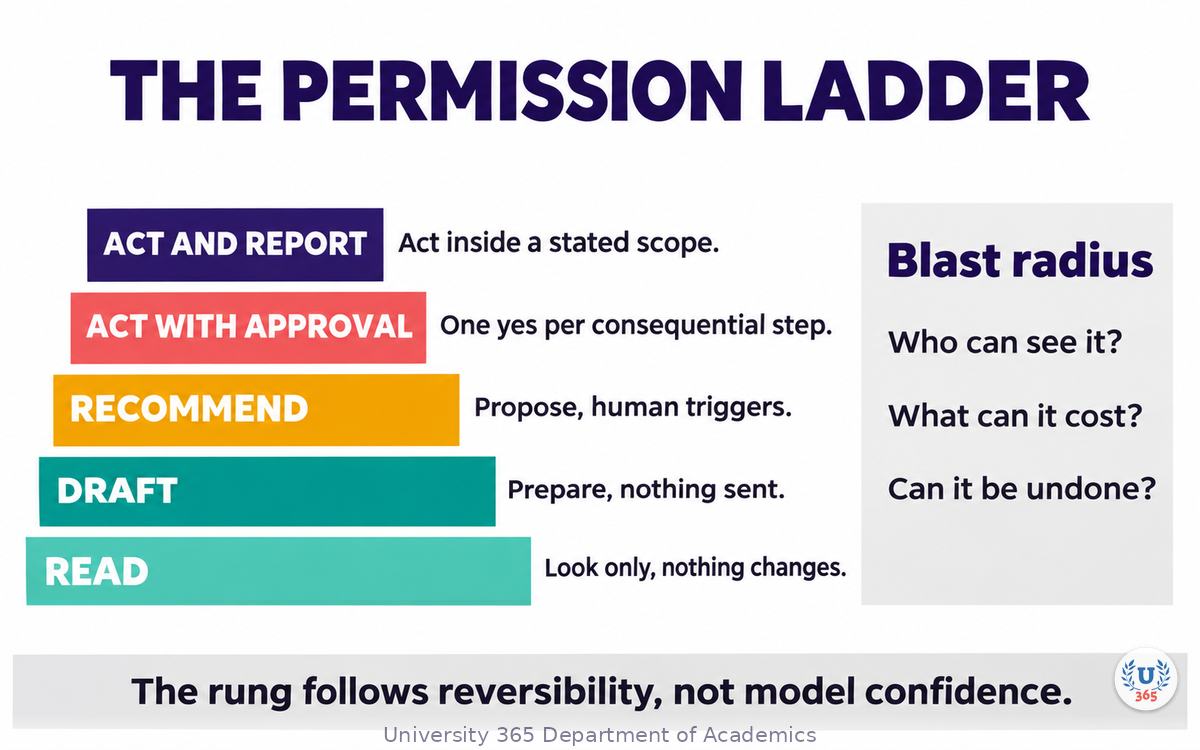
A permission ladder has five rungs, and each is a different contract. Read: the agent may look, opening files and querying systems, with nothing changing in the world. Draft: the agent prepares work with no effect until a human releases it. Recommend: the agent proposes one action with its reasons and a human triggers it. Act with approval: the agent prepares and executes one consequential step per explicit yes, and the yes names the object and the consequence. Act and report: the agent acts inside a stated scope and reports afterwards, safe only where the action is reversible, low value, or covered by a standing instruction the user wrote.
The rule that assigns a rung is not model confidence. It is reversibility. A high-confidence irreversible action still needs approval, because confidence is the model's opinion about its own output while reversibility is a fact about the world. Teams that assign permissions by confidence ship agents that are confident and wrong in the same week.
Blast radius is the second half, and it is a design decision rather than an engineering one. Three questions define it: who can see the result, what can it cost, and can it be undone. Archiving an email has a small radius and deleting it has a larger one. Sending a draft to one colleague is small and sending it to four hundred clients is not. Reading a calendar is free and moving a meeting that eight people attend is not.
Use the radius to place friction. One approval can cover thirty low-radius steps, which keeps the flow usable. Individual approvals belong on the two steps whose consequences cannot be reversed by hand.
Then write the ladder into the product specification as well as the system prompt. A prompt asks the model to be careful. A permission system that refuses an action is a guarantee, and when the two disagree the guarantee is the one that protects your customer. The same logic governs chains: the model must never decide its own permissions, and each agent in a chain acts under its own scope and leaves its own receipt.

Agent Experience: Designing for Users Who Delegate
Waiting Well: Progress You Can Trust
Agent work takes time, and time is a design material. A chat interface trained users to expect tokens within a second. An agent that runs for four minutes breaks that expectation, and the interface has to replace it with something better than a spinner.
Track three clocks and show two. Elapsed time is what the user can already see. Expected time is what the system believes, as a range. Worst case is the number you keep for the point where you must tell the user something changed. A range sounds less confident than a number and is more trustworthy, because it survives the first slow run.
The thresholds are practical rather than sacred. Under about ten seconds, keep the user in place with visible step progress: current step, steps completed, steps left. Beyond that, let them leave without cancelling the work, and bring them back when the run finishes or when a decision is needed. A progress screen that requires the tab to stay open trains users to abandon.
Name the step, not the machinery. "Checking the pricing pages" lets a user judge whether the work is on track. "Processing" tells them nothing and costs you the benefit of the wait.
Never show a determinate progress bar for work the system cannot measure. A bar that reaches ninety percent and sits there for four minutes does more damage than an honest range, because it teaches the user that your estimates are fiction. The same rule applies to invented percentages of completion and to tokens remaining.
Finally, design the stuck state. An agent waiting on a permission, a login, a rate limit or a human reply is not the same as an agent that is thinking, and the copy should say which. Most "the agent is slow" complaints are really "the agent needed something and never said so". The same distinction governs background work: a standing task should nudge at a natural pause with a decision attached rather than interrupt, and it needs a visible scope and an expiry. Microsoft's Agent (Time) principle states it plainly: nudge more than notify (Microsoft Design, 2025).

Agent Experience: Designing for Users Who Delegate
When to Interrupt: The Clarification Budget
Every interruption costs attention, and attention is the resource the user delegated the work to preserve. An agent that asks five questions before doing anything has moved the work back to the human with extra steps.
Set a clarification budget in the product, not in the prompt. Two questions before the first action is a workable default for most tasks. After that, the agent acts on stated assumptions and flags them in the plan and the receipt. The user can correct them at the plan stage, which is cheaper for everyone than a third question.
Use two tests for every question and every approval you are tempted to add. The question test: would the answer change the next action? If the agent would do the same thing either way, the question is theatre. Delete it. The approval test: would a meaningful fraction of users refuse? If the refusal rate would be near zero, the approval is noise, and noise trains people to approve without reading. Log the action and let the receipt carry it.
Batch what remains. One screen with three questions and sensible defaults beats three screens in sequence, because the user can answer in one act of attention. Put the default first, so a trusting user accepts in one click and a careful user changes one field.
Write the escalation rules down. Ask when the action is irreversible. Ask when scope would expand beyond what the user stated. Ask when the target is a person outside the user's team, because social consequences are hard to undo. Ask when cost crosses a threshold the user set. Ask when confidence is low and verification would be expensive afterwards. Do not ask for anything else.
Teams add a confirmation every time something goes wrong, and after a year the interface asks eleven times for permission to read a file. The right response to an incident is to narrow the scope and improve the receipt, not to add a dialog. Dialogs do not prevent errors. Scopes do.
Agent Experience: Designing for Users Who Delegate
Approval, Receipts and the Audit Trail
An approval screen is a small document with five obligations: what will happen, in a sentence with a verb and an object; where it will happen, in which account, folder or audience; what it will cost in money, time or social capital; whether it can be undone; and how long the undo window lasts.
Name the object and the consequence. "Send the invoice to 12 clients" is an approval. "Proceed" is a shrug with a button. The difference is not cosmetic: users approve the first correctly and the second blindly, and the second is where incidents come from.
After execution, the receipt. A receipt is one screen that answers what happened without requiring the user to read a transcript. It carries the brief as understood, the plan as executed, the tools and accounts touched, the targets, the cost, the timestamps, and links to the objects that changed. If the agent sent an email, the receipt links to the sent message. If it spent money, the receipt shows the amount and the merchant.
The activity log is a reading surface, not a debugging dump. Group by step, write verbs in the past tense, keep internal reasoning out of the main view but available on demand. A raw trace with token counts and tool calls is evidence for an engineer and noise for a customer.
Accessibility matters more here than on most surfaces, and the standard is explicit. WCAG 2.2 success criterion 4.1.3, Status Messages, requires that status changes be programmatically determinable so assistive technology can announce them without moving focus (W3C, WCAG 2.2). Agent progress, completion and approval requests are exactly that class of message. A receipt that exists only as visual layout excludes the users who most need a reliable record.
Agent Experience: Designing for Users Who Delegate
Failure States and the Recovery Loop
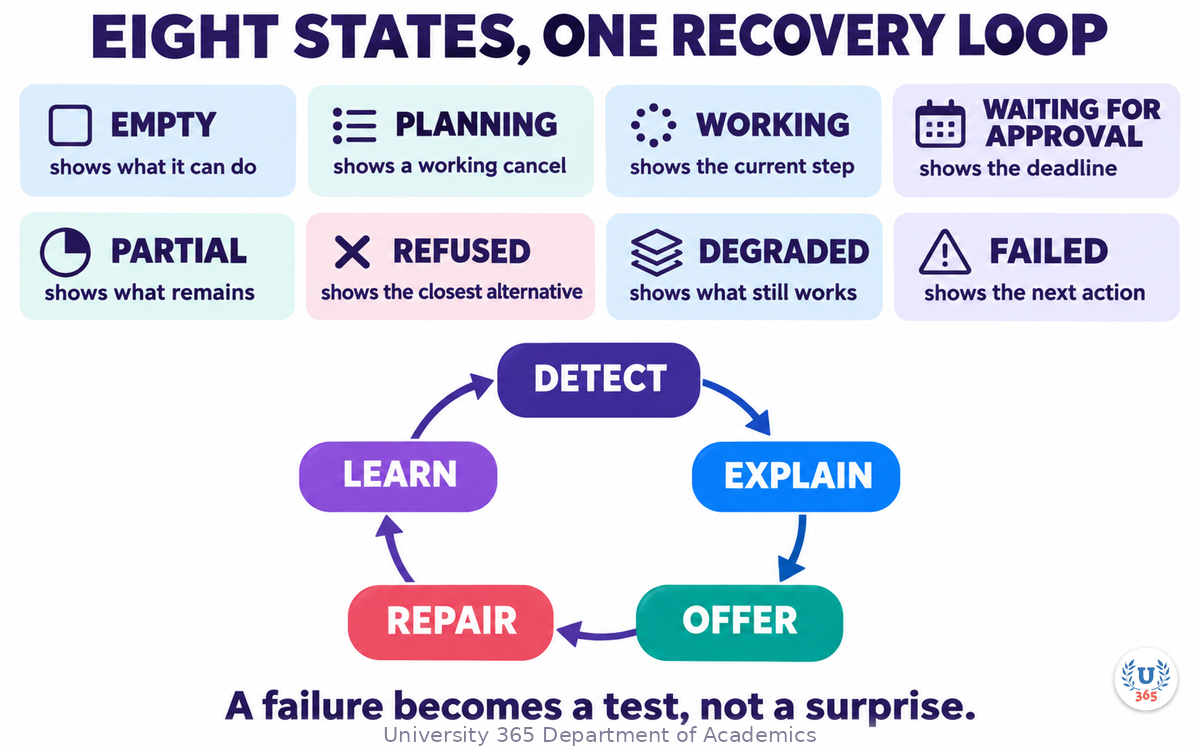
Agents fail in more ways than conventional software, and each way needs its own copy. Design eight states, and give each one a sentence the user can read and one action they can take.
Empty: what this agent can do, with two examples the user can run in one click. Planning: the plan is being prepared, with a cancel that works. Working: the current step, the steps left, and a time range. Waiting for approval: the decision, the deadline, and what happens if nobody answers. Partial: what succeeded, what did not, and what remains. Refused: what the agent will not do and why, plus the closest thing it can do instead, because a refusal without an alternative is a dead end and dead ends teach users to stop delegating. Degraded: which capability is missing, what still works, and what the user loses by continuing. Failed: what failed, what was preserved, and the next action, with the retry scoped to the failed part rather than the whole run.
Recovery is a loop with five stages. Detect: a defined failure signal, whether an error, a validation rule, a missing permission or a user correction. Explain: the cause in the user's terms, with the object named. Offer: two paths, one cheap and one complete, so a hurried user and a careful user both have a route. Repair: preserve the work already done and never force a restart as the only option. Learn: log the case into the evaluation set so the same failure becomes a test rather than a surprise.
Microsoft's lifecycle guidance for agents makes the same argument: provide correction pathways that do not force users to restart workflows, and surface the context that explains why an output appeared (Microsoft Learn, 2026). Apple's generative AI guidance says it more briefly: keep people in control, and give them the ability to revert or retry what they do not agree with (Apple Human Interface Guidelines, 2026).
Agent Experience: Designing for Users Who Delegate
Trust Calibration and the Overreliance Trap
Two failures sit on opposite sides of one dial. Overreliance is accepting agent output without checking. Algorithm aversion is ignoring a reliable agent after one bad experience. Calibration is the state where reliance tracks reliability, task by task.
Overreliance is the more dangerous in a delegation interface, because the interface makes acceptance cheap. One "looks good" button, a smooth summary and a confident tone are enough to move a reviewer from judgement to rubber stamp.
Five moves help. Make verification cheaper than repetition: a diff, a side-by-side or a change shown in context beats asking a user to redo the work to compare. Put evidence next to claims: the file, the line, the source, the timestamp. Express uncertainty as a band tied to evidence rather than a percentage, because "based on two pricing pages and one earnings call" is usable while "87 percent confident" is not. Vary friction with consequence, so low-stakes actions stay fast. And publish the agent's known weak spots on the first-run screen, because a user who knows where the agent is weak checks exactly there.
Then the doctrinal point. Over-delegation is a design outcome, not a user failing. If the interface removes the thinking as well as the typing, the human term in the Co-Intelligence equation declines and the total declines with it. U365's CI-First approach names the human as the ruler and orchestrator for that reason, and it works as a design constraint: every agent flow should keep at least one deliberate human judgement, at the point where the consequence is highest.
Agent Experience: Designing for Users Who Delegate
Accessibility: Delegation Must Reach Everyone
Accessibility used to be framed as a compliance cost. In agent design it is a functional requirement, and the measurement is unusually direct.
NN/g measured how agents read interfaces. A vision-based agent takes screenshots, and a single screenshot can cost tens of thousands of tokens to process. An agent reading the accessibility tree, the same structured representation screen readers use, spends a few thousand tokens and gets more reliable information about roles, labels, states and relationships (NN/g, April 2026). The qualities that make a product usable with a screen reader are the qualities that make it legible to an agent: semantic structure, descriptive labels, predictable patterns, logical hierarchy.
That finding has two consequences. Accessibility work is now infrastructure for delegation, and a team that has neglected it will find its product harder to automate than a competitor's. And the agent interface itself inherits the constraint: if your approval screen is a canvas of unlabelled controls, both the screen reader user and the agent fail on it.
On the human side, three requirements matter most. Announce every state change, which is the WCAG 2.2 Status Messages requirement applied to agent progress. Keep targets large enough for motor accessibility, per the WCAG 2.2 target size criterion. And let approval screens wait indefinitely, because a timeout that auto-approves or auto-cancels punishes exactly the users who need more time to read.
Approval fatigue is an accessibility issue before it is a usability issue. A user with a motor impairment, a cognitive load condition or a screen reader is the first to be pushed into approving without reading, because every unnecessary dialog costs them more than it costs anyone else. Reducing the number of approvals is a speed decision and a quality decision, because it is what keeps the remaining approvals meaningful.
Agent Experience: Designing for Users Who Delegate
Measuring Agent Experience
You cannot manage delegation with task success alone. A flow where the agent succeeds because the user rebuilt the output completely is a failure with good manners.
Measure four families, and instrument the plan as well as the outcome.
Outcome: task success as the user defines it, time to first useful output, cost per completed task, and rework rate. Rework is the honest one, because it captures the distance between a result the user accepted and a result the user had to rebuild.
Interaction: intervention rate, meaning human edits per completed task; approval latency; approval refusal rate; questions per task; and abandonment at each state. Abandonment by state tells you which screen loses people, which no aggregate number will.
Trust: calibration, measured by comparing stated confidence with the actual outcome; verification rate, meaning how often users open the evidence you provide; and undo rate. A rising undo rate with a stable success rate usually means the interface is hiding consequences, not that the agent got worse.
Quality: escalation rate, refused-task rate, and recovery success, meaning the share of failures that end with the user completing the task through one of the offered paths.
Instrument the plan, not just the task. An agent that fails at step seven of eight and recovers is a different product from one that fails at step one, and both look identical in a success-rate dashboard. Log the failing step, the interface state, and the path the user took out of it.
Agent Experience: Designing for Users Who Delegate
The Delegation Audit
Here is the method the lecture has been building towards. It takes about forty minutes for one flow and produces a score you can defend in a review.
Pick one flow. Not the product, one flow: the single journey where a user hands over a task and the agent does work on their behalf.
Answer eight questions, and score each from 0 to 2.
One. Can the user state the brief in five slots: who, what, where, how far, what not? Score 2 if the interface asks for all five, 1 if the user must remember some, 0 if the brief is a blank text area.
Two. Is the plan visible and editable before execution? Score 2 for a step-level editable plan with tools and irreversible steps marked, 1 for a read-only plan, 0 for none.
Three. Is every consequential action behind a permission rung matched to reversibility? Score 2 if the ladder is written in the spec and enforced in code, 1 if it exists only as prompt instructions, 0 if permissions are binary.
Four. Are the eight states designed, each with copy and an action? Score 2 if all eight exist in the build, 1 if only the happy path and the error state exist, 0 if there is only a spinner.
Five. Does every execution leave a readable receipt? Score 2 if the receipt carries brief, plan, targets, cost and links, 1 if it links to the transcript, 0 if nothing is recorded.
Six. Is there an undo path inside a stated window? Score 2 if the window is stated and enforced, 1 if undo exists but the window is undocumented, 0 if actions are final.
Seven. Is verification cheaper than repetition? Score 2 if evidence sits next to the claim, 1 if the user must open another system to check, 0 if checking means redoing the work.
Eight. Are intervention rate and failure step measured? Score 2 if both are instrumented and reviewed monthly, 1 if one exists, 0 if neither.
Add the eight scores. Zero to six means do not ship without a written risk note naming the two worst fields. Seven to twelve means fix the two lowest before the next release. Thirteen to sixteen means the flow is ready for wider rollout.
A worked example makes it concrete. An inbox triage agent reads new mail, labels it, drafts replies for routine requests, and sends nothing. Brief: partial, because the user can set rules but not a per-run brief, score 1. Plan: none, the agent just runs, score 0. Permissions: drafting only, which is reversible, score 2. States: empty, working and failed exist, score 1. Receipt: a list of labelled messages with no reasoning, score 1. Undo: labels can be reverted in the mail client, window undocumented, score 1. Verification: the user reads the draft before sending, score 2. Measurement: none, score 0. Total eight, so the flow needs two fixes, a plan preview and a failure-step metric, before it reaches a team of fifty.

Agent Experience: Designing for Users Who Delegate
Feynman Summary: Explain It Like You Are 12
Imagine you ask someone to run an errand. You tell them what you want, where they may go, how much they may spend, and what to bring back as proof. If you forget the budget, they might spend too much. If you forget the proof, you cannot check what they did. If you forget where they may go, they might end up somewhere you did not expect.
An agent is that helper, except it is very fast, it never gets tired, and it takes your instructions literally. That is why the four things have to be written down and shown to you before the work starts, not remembered and assumed.
The interface is the piece of paper where the four things are written: what you want, what it may touch, when it has to ask you, and what it brings back. A good interface makes those four easy to write, easy to read and easy to correct. A bad interface hides them inside a chat box and hopes. The other half is what happens when the helper gets it wrong: a good interface says what went wrong, keeps the work already done, and offers two ways forward.

Agent Experience: Designing for Users Who Delegate
Mindmap: The Complete Picture
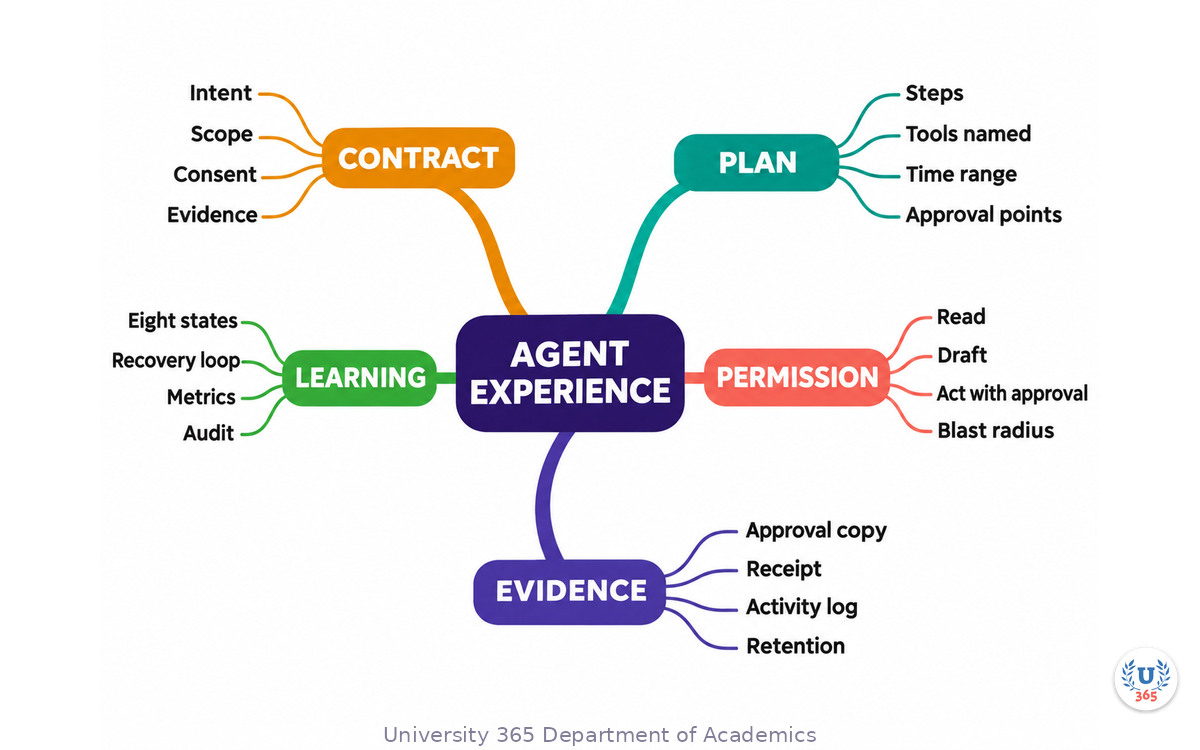
The mindmap carries the lecture on five branches. Contract holds intent, scope, consent and evidence. Plan holds steps, tools, estimates and approval points. Permission holds the five rungs, blast radius and the reversibility rule. Evidence holds approval copy, receipts, the activity log and retention. Learning holds the eight states, the recovery loop, measurement and the audit. Print it and keep it beside the flow you are reviewing.
UNOP Sound (University 365 Neuroscience Oriented Pedagogy)
Take five minutes to consolidate your memory. Play the isochronous tone track (10Hz alpha frequency) with your eyes closed. Alpha-frequency tones after a learning session support consolidation, helping move what you just learned from short-term to long-term memory.
[Audio player: UNOP Post-Lecture Isochrone (10Hz, 5 minutes)]
Agent Experience: Designing for Users Who Delegate
Practical Exercise: Audit One Delegation Flow
This exercise takes about forty-five minutes and produces one page you can take into a design review.
Step one, choose the flow. Pick a single journey where a user hands over a task to an agent. If you have no agent in production, use the closest thing: a copilot that drafts, a workflow that files, a scheduler that books.
Step two, write the brief. Compose the five slots as the user experiences them today: who, what, where, how far, what not. Note which slots the interface asks for and which it leaves to memory. Most flows ask for two and assume three.
Step three, draw the plan as the user sees it. Copy the actual screen, not the intended design. Mark where the steps are, where tools are named, and where irreversible steps sit.
Step four, list every consequential action and assign each one a rung on the ladder. Mark the ones where the rung you assigned is higher than reversibility justifies. Those are your permission defects, and they are usually the most expensive in the flow.
Step five, write the copy for all eight states, one sentence and one action each. This step exposes more gaps than any other, because most flows have three states in the design file and eight in reality.
Step six, design the receipt. Decide what a user needs to see to answer "what did it do" in under a minute, and where the receipt lives afterwards. If the answer is "in the chat history", you have found a defect.
Step seven, score the flow with the eight questions and name the two lowest fields.
Step eight, pick two fixes for the next sprint. Two, not eight. A review that lists eight defects produces a document. A review that names two produces a change.
Deliverable: one page with the brief, the plan sketch, the permission table, the eight state sentences, the receipt outline and the score. Bring it to the next design review and compare it with a colleague's page for a different flow. The comparison is where a standard becomes shared.
A pass mark for the exercise: a colleague who has never seen the flow can read your page and state, without asking a question, what the agent may do, when it must ask, what the user gets back, and how it fails. If they cannot, the page is not finished, and neither is the flow.

Agent Experience: Designing for Users Who Delegate
Glossary
Term | Definition |
Agent | A system that pursues a goal by iteratively taking actions, evaluating progress and deciding its own next steps |
Agent experience | The design of the brief, plan, permissions, states and receipts through which a user delegates work to an agent |
Brief | The structured handover a user writes: who, what, where, how far and what not |
Delegation contract | The four fields every agent feature must state: intent, scope, consent and evidence |
Blast radius | The maximum consequence of one error: who can see it, what it can cost, and whether it can be undone |
Permission ladder | Five rungs of agent authority: read, draft, recommend, act with approval, act and report |
Reversibility | Whether an action can be undone, which is the rule that assigns a permission rung |
Receipt | A readable record of what an agent did, with targets, cost, timestamps and links to the objects changed |
Recovery loop | The five-stage path from failure to repair: detect, explain, offer, repair, learn |
Trust calibration | The state where a user's reliance on an agent tracks its actual reliability, task by task |
Intervention rate | The number of human edits per completed agent task, the core interaction metric of delegation |
Approval fatigue | The decline in reading and judgement caused by too many approval requests, which turns consent into rubber stamping |

Agent Experience: Designing for Users Who Delegate
Quiz: TEST YOUR UNDERSTANDING
1. Which four fields make up the delegation contract?
A) Intent, scope, consent, evidence
B) Prompt, model, temperature, tokens
C) Design, build, test, ship
D) Speed, cost, quality, risk
2. What should assign an agent's permission rung?
A) The model's confidence score
B) The user's seniority
C) The reversibility and blast radius of the action
D) The length of the prompt
3. Why is a determinate progress bar a defect when the work cannot be measured?
A) It uses too much CPU
B) It teaches users that your estimates are fiction
C) It is hard to translate
D) It requires a server
4. What makes verification cheaper than repetition?
A) A longer summary
B) A confidence percentage
C) A diff, a side-by-side or a change shown in context next to the evidence
D) A faster model
5. According to the accessibility research cited in the lecture, why does the accessibility tree matter for agents?
A) It renders faster screenshots
B) It costs far fewer tokens than screenshots and gives more reliable structure
C) It hides content from users
D) It replaces the need for labels
Answers: 1-A, 2-C, 3-B, 4-C, 5-B

Related Resources
U365 INSIDE Publications
External Resources
Related U365 Lectures (Coming Soon)
Generative UI: From Prompt to Interface (UID UX/UI Series)
Design Ops with AI: Briefs, Reviews and Handoff (UID Creative Tech Series)
The Designer's Workflow with AI Agents (UID Creative Tech Series)
Agent Experience: Designing for Users Who Delegate
U.Copilot for This Lecture
You are my agent experience reviewer. I am designing one flow where a user delegates a task to an agent and I need a critique before build. Flow: [name and one sentence] User: [who delegates and what they hand over] Agent scope: [systems, data, money and people the agent may touch] Current design: [brief screen, plan screen, approval points, states, receipt] Do six things: 1. Write the delegation contract in four sentences: intent, scope, consent, evidence. Name the field that is weakest and the failure class it invites. 2. Rewrite the brief as five slots (who, what, where, how far, what not) and show what the interface should ask for. 3. Draw the plan as the user would see it, with tools named and irreversible steps marked. 4. Assign a permission rung to every consequential action and flag any rung higher than reversibility justifies. 5. Write the eight states with one sentence of copy and one action each: empty, planning, working, waiting for approval, partial, refused, degraded, failed. 6. Design the receipt in six lines and propose the three metrics I should instrument, including intervention rate and failure step. Ask me one clarifying question before you start if the scope or the consequence is ambiguous.
Agent Experience: Designing for Users Who Delegate
Next Steps
Write the delegation contract for one agent flow in four sentences and name the weakest field.
Replace every confidence percentage in the flow with an evidence band that cites sources and recency.
Assign a permission rung to each consequential action and lower any rung that reversibility does not justify.
Write the copy for all eight states, then break the agent on purpose and watch five users recover.
Score the flow with the eight-question audit and take the two lowest fields into the next sprint.

Agent Experience: Designing for Users Who Delegate
IMPORTANT NOTICE
Copyright University 365, Inc. All rights reserved. This lecture is provided for educational purposes and does not constitute legal, financial or professional advice. For enrollment, visit university-365.com/tuition. For permissions or inquiries, contact uda@university-365.com.
Published by the Department of Academics, University 365.
Lecture delivered by the University 365 Institute of Design (UID).
Joe Borazian, Dean of Design, UID
Signed for the academic year 2026.




Comments