
From GPTs to Projects: A Strategic Guide for Individuals and Institutions

Updated: Oct 8


UIB University 365 Institute of Business
Series Business AI Series | Level Basic (Free)
Duration 25 minutes | Access Free
Business Management, Digital Entrepreneurship, Innovation, Finance, Leadership

UNOP Sound (University 365 Neuroscience Oriented Pedagogy)
Take five minutes to prepare your brain. Play the isochronous tone track (40Hz gamma frequency) with your eyes closed. Gamma-frequency tones before a learning session raise attention and make the material easier to absorb.
[Audio player: UNOP Pre-Lecture Isochrone (40Hz, 5 minutes)]
In this Lecture

The Hook: Your Question, Answered
You have a client you have worked with for eight months. You have explained the background four times, re-uploaded the same three documents twice, and last week the assistant gave you advice that contradicted a decision you both made in June, because it had no idea June had happened.
The problem is not the model. The problem is that every conversation starts from nothing.
This is the gap that persistent workspaces were built to close, and it is why the strategic advice has shifted from packaging assistants to structuring workspaces. A workspace holds the chats, the files and the instructions together, keeps memory scoped to that work, and lets you return to a thread that still knows where it was.
But the shift is not a simple upgrade, and this lecture will not treat it as one. Workspaces solve continuity and they create new problems: memory that you have to inspect, files that behave differently when shared, and, for an institution, a set of governance questions about where your data sits and who can see what. A team that moves wholesale to workspaces without answering those questions has traded a small problem for a larger one.
So the honest position is this. Neither container is better in general. A packaged assistant is better for distributing one fixed behaviour to many people. A workspace is better for work that accumulates and needs continuity. Most organisations need both, and the strategic skill is knowing which job goes where.
You will learn to use AI deliberately here, in five minutes of practical work and twenty of structured reading. You direct. The workspace holds the context. This is the CI-First approach: human intelligence orchestrates, AI amplifies.
What a Persistent Workspace Actually Is
A persistent workspace, whatever the vendor calls it, has five parts. Knowing them makes the comparison with a packaged assistant concrete rather than rhetorical.
A container that holds related conversations. Chats started inside the workspace belong to it. They are not lost in a general history, and they can be returned to later with their context intact.
Instructions that apply to every conversation inside it. Instead of repeating your role and preferences each time, you set them once for the workspace. This is the same idea as an assistant's instructions, used differently: it is not a separate object people discover, it is the frame around your own work.
A file library. Reference documents live in the workspace rather than being attached per conversation. New conversations can draw on them without re-uploading.
A memory store scoped to the workspace. Facts the system judges worth retaining are kept for this workspace and read back in later conversations inside it. Crucially, this is scoped: a fact recorded here does not leak into your other work, and the stored items are meant to be viewable and editable.
Pre-enabled capabilities and connections. The tools, connectors or reusable instruction packages you have turned on for this workspace, so that each conversation inside it has the same capabilities.
Three properties follow, and each one is a real change rather than a convenience.
The first is that continuity is the default rather than something you reconstruct. The second is that the boundary of the context is explicit: this workspace, these files, this memory, not everything you have ever discussed. The third is that the workspace is a container for a body of work, which means it has a lifecycle: you open it for a client or a project, and you eventually close it, and that closure has consequences you should think about before it happens.
Why Continuity Changes What You Can Ask For
Continuity is not just convenience. It changes the class of question you can ask.
Without continuity, you ask single-shot questions. Summarise this. Draft that. Explain this concept. Each answer stands alone, and any question that depends on what was established earlier has to be reconstructed inside the prompt, which means you spend your effort re-establishing context rather than thinking.
With continuity, you can ask cumulative questions. What changed in our position since June. Which of the decisions we made have we not yet implemented. What are the open questions across these eight weeks of discussion. Where have we contradicted ourselves. These questions were practically unaskable before, not because a model could not answer them but because no model had the material.
Four kinds of work change character once continuity exists.
Advisory work over time. A consulting engagement, a legal matter, a coaching relationship. The value is in the accumulating history and the decisions made along the way, and a workspace makes that history a usable asset rather than a folder nobody opens.
Research and synthesis. A topic you follow for weeks, with papers, notes and your own evolving conclusions. The workspace holds the hypotheses you have ruled out as well as the ones you are testing, which prevents you from re-exploring ground you already covered.
Recurring reporting. A weekly or monthly deliverable where the previous period is the baseline for the current one. Continuity means the comparison is real rather than reconstructed from memory.
Writing anything long. A report, a book, a course. Section five needs to agree with section two, and the workspace is what makes that check possible.
One caution that prevents disappointment. Continuity helps most when the material is stable and the questions evolve. It helps least when the material changes constantly and each question is genuinely independent, because then you are paying for a container you do not need. Judge continuity by whether your questions depend on history, not by whether you like the idea of it.
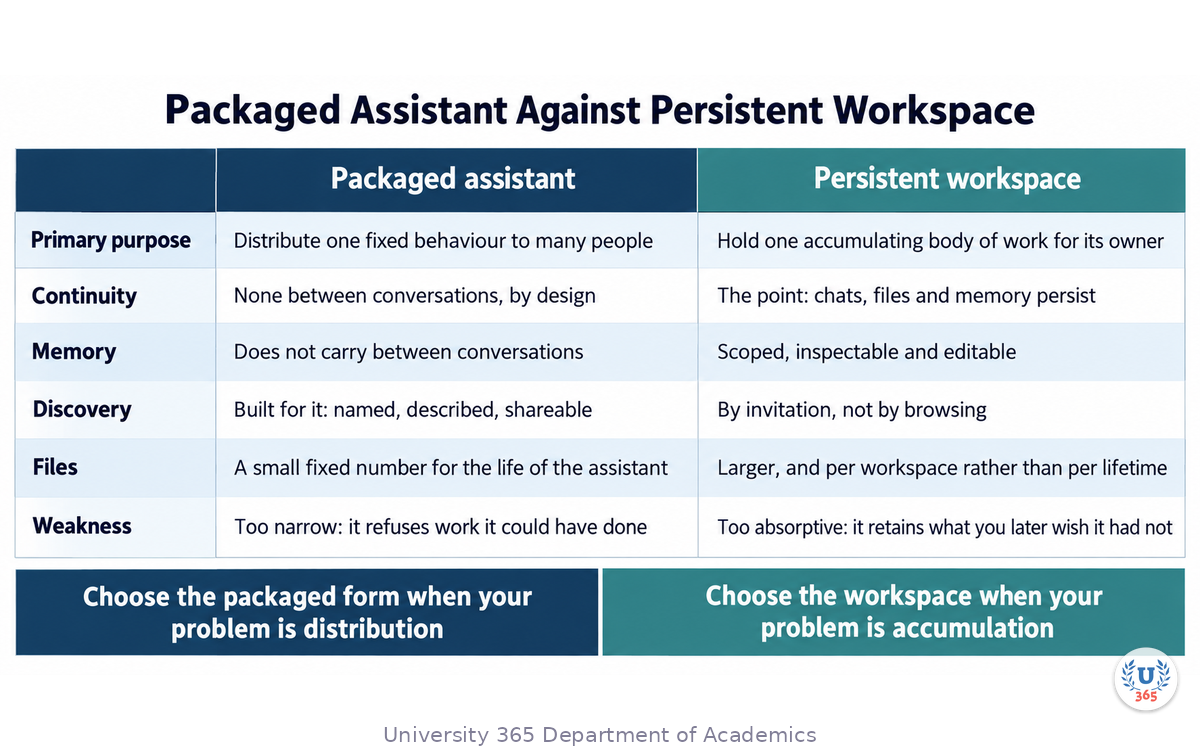
The Real Comparison: Packaged Assistant Against Workspace
Here is the comparison as it actually plays out, without a winner declared in advance.
Dimension | Packaged assistant | Persistent workspace |
Primary purpose | Distribute one fixed behaviour to many people | Hold one accumulating body of work for its owner |
Who can create it | On the current platform, creation is restricted and being retired; historically any paid plan | Generally every plan, including free tiers with limits |
Continuity | None between conversations by design | Continuity is the point: chats, files and memory persist |
Memory | Does not carry between conversations | Scoped memory, intended to be inspectable and editable |
Discovery by others | Designed for it: named, described, shareable | Limited: a workspace is found by invitation, not by browsing |
Sharing | Historically broad, up to whole workspaces or a public directory | More limited, and where sharing exists it is usually within a team or workspace |
File capacity | Historically a small fixed number for the life of the assistant | Larger, and generally per workspace rather than per lifetime |
Tool access | Connected apps or custom actions, chosen by the builder | The same tools as a normal conversation, plus workspace-level connections |
Editing by users | Builder-only configuration | Owner-controlled, and a shared workspace can give edit or chat access |
Lifecycle | Retired by the vendor on a published schedule, as is happening now | Closed by its owner when the work ends |
Best failure mode | A narrow assistant that says the job is out of scope | A workspace that holds context you did not intend to keep |
The last row is the one people miss. The packaged assistant's weakness is that it is too narrow and will refuse work it could have done. The workspace's weakness is that it is too absorptive and will retain things you later wish it had not. Both are manageable, and they are managed differently.
A practical rule that follows from the table. If your problem is distribution, choose the packaged form and accept that it will not remember anything between conversations. If your problem is accumulation, choose the workspace and accept that you now own a memory store and a data-retention question. If you have both problems, which most organisations do, run both and keep the boundary explicit: the assistant handles the repeatable process, the workspace holds the engagement.
The Four Decisions That Settle the Choice
Four questions settle almost every case. Ask them in order.
One: does the work accumulate? If the value of the work depends on what was established earlier, this is workspace work. If each instance is genuinely independent, a packaged assistant or even a saved prompt is the better container. Most people answer this too quickly. The test is whether you have ever wished a conversation remembered something. If you have, it accumulates.
Two: does one fixed behaviour need to reach many people? If forty people need the same defined output, you need distribution, and that is the packaged form regardless of how you feel about accumulation. A workspace shared with forty people is a shared document, not a packaged behaviour, and it will drift.
Three: who needs to see it, and who must not? A packaged assistant is discoverable by design: people find it and use it. A workspace is private by default, shared deliberately. If your work involves client material, health information, or anything with a confidentiality obligation, the default matters more than the features, and the private-by-default container is usually the honest answer.
Four: what is the life of the work? A repeatable process should outlive any individual. A client engagement ends. A research project concludes. Naming the end at the start is what stops an organisation from accumulating a thousand abandoned workspaces with no owner.
Two of the four answers, and the choice is usually made.
There is a fifth consideration that is not a question but a constraint, and it is the one institutions keep discovering late. Where does the data actually live, and under whose control? A workspace that holds client material is a data-processing decision, not a productivity decision. If you cannot answer where the content is stored, for how long, and who inside the organisation can reach it, you are not ready to put regulated material into a workspace. That is not a reason to avoid workspaces; it is a reason to settle the governance before the rollout, and the section on the governance gap returns to it.
Memory, and the Question Nobody Asks
Workspace memory is the feature that makes continuity real, and it is also the feature least understood by the people using it.
Memory in a workspace is scoped and structured rather than general. The system retains facts it judges to be durable: a stated preference, a deadline, a constraint, a decision. It reads them back in later conversations inside that workspace. The stored items are intended to be visible and editable, so you can see what the system believes about your work and correct it.
Four questions to ask about memory before you rely on it, and each one has a consequence.
What happens when memory and the current conversation disagree? The current statement should win, and you should know whether your system behaves that way. Test it: correct a remembered fact in a new conversation and check whether the correction is respected or overridden.
How is memory scoped? A shared workspace may be set to workspace-only memory, which means it cannot see anyone's personal memories or personal instructions. That is usually what you want for a team, and it also means a tool that depends on personal context will not be available inside it. Find out which mode you are in before you design a workflow around it.
What is retained, and for how long? A memory store is a data store. It holds statements about clients, projects and decisions. If your organisation has a retention policy for project documents, it should apply to memory too.
Who can see it? In a shared workspace, the answer is everyone in the workspace. In a personal one, it is you. Anything you would not put in a shared folder should not go into shared memory, because that is effectively what it is.
A working habit that costs nothing: review the memory panel of any workspace you use regularly, once a month. Read the list the way you would read a colleague's notes about you, and delete anything wrong, stale, or that you would rather not have recorded. Five minutes a month prevents a class of error that is otherwise very hard to diagnose, because a wrong remembered fact silently shapes every answer afterwards.
One more note on the boundary between memory and files. A remembered fact is short and general; a document is long and specific. If a fact matters enough to be relied on, put it in a document in the workspace as well, where you can version it and quote it. Memory is convenient and it is not a system of record.
Shared Workspaces: What Changes When a Team Is Inside
A workspace with one person in it is a filing cabinet with an assistant. A workspace with a team in it is a different object, and several things change at once.
Deletion becomes collective. Removing a file from a shared workspace removes it for everyone. Deleting the workspace deletes the conversations inside it for every member. The single-user habit of treating a delete as a private act does not survive contact with a team.
Access is granted in two shapes. Typically a member can either chat within the workspace or edit it, meaning they can change the instructions, the files and the structure. Decide which each person needs, and grant the smaller one by default. An editor can change the frame that everyone else works inside.
Groups do not update themselves. People added to a group after a workspace was shared may not automatically see it. Sharing is an event, not a subscription, and it has to be repeated when the team changes.
External sources behave differently. A linked document from a cloud drive may not be synchronised into the workspace's index in advance, which means the assistant can still search it but does not have it ready. If a document is important enough to be relied on, put a copy in the workspace rather than a link.
The memory becomes shared memory. Everything discussed in a shared workspace is visible to the workspace, and the memory it retains is retained for the workspace. This is usually the desired behaviour, and it needs to be said out loud once, so nobody discovers it in a meeting.
For an institution, two further points belong here.
First, a shared workspace is a governance boundary, and the boundary should be drawn by the work rather than by the tool. One workspace per client matter, one per department initiative, one per research project: the naming convention should make the boundary obvious, because a boundary nobody can see is a boundary nobody respects.
Second, the exit matters as much as the entry. Before you open a workspace that will hold material of record, decide how it will be archived, what will be extracted into the institutional record system, and what will be deleted. A workspace that ends by being abandoned is a data-retention problem with a name attached to it.
The Governance Gap: Data, Retention and Approval
This section is the one the platform documentation will not write for you, because it depends on your obligations rather than on your tools.
Data residency and control. Where is the content stored, and under which terms? For an organisation handling personal data, the answer is a processing question with a legal dimension, and it should be answered by whoever owns that obligation rather than by the person who set up the workspace.
Retention. How long does the content persist, and can you delete it on demand? A shared workspace contains conversations, files and memory. If a client asks you to delete their material, you need to know every place it landed, and memory is the place people forget.
Access review. Who can reach the workspace today, and is that list still correct? Access granted for a project that ended six months ago is a finding in an audit, and the review should be scheduled rather than reactive.
Approval gates. Which actions in the workspace may be taken autonomously, and which require a human? The CI-First doctrine is explicit here. The human sets what the system is allowed to do. In a workspace this means naming the actions that need approval and writing them into the process, rather than relying on everyone exercising good judgment privately.
Attribution. When an output goes out, is it clear how it was produced and who is accountable for it? An institutional process needs an owner for every published artifact, whatever tools were involved in producing it.
Third-party exposure. Which external apps and connectors are enabled, and what does each one see? A connector that can read a shared drive is a grant of access, and grants accumulate quietly.
The practical form of all six is one page per workspace: purpose, owner, members, data classification, retention rule, enabled connections, and the approval points. One page, written before the workspace is used for anything consequential, and reviewed when the work ends. That page is the difference between a tool that scales and a risk that accumulates.
An Institutional Migration Plan in Four Phases
For an institution moving from packaged assistants toward workspaces, this is the sequence that works, and it is deliberately conservative.
Phase 1: Classify the existing work. Take everything in use and sort it into three piles: fixed processes that should be packaged and distributed, accumulating work that belongs in a workspace, and one-off tasks that need neither. Most organisations find the piles are roughly balanced, and that a large share of what they built as an assistant was really workspace work all along.
Phase 2: Standardise the frame before you open anything. Write the workspace template: the instruction block, the file structure, the memory policy, the naming convention, the exit rule. Doing this once, before the first workspace, is what prevents fifty inconsistent ones. Publish it as the only approved way to start a workspace.
Phase 3: Pilot with three workspaces of different kinds. One client or engagement workspace, one recurring reporting workspace, one research workspace. Run them for a month, review the memory panels weekly, and record what surprised you. The pilots are how you find the governance questions your template did not anticipate.
Phase 4: Roll out, with the assistant layer kept. This is the important structural point. The migration is not a replacement. Packaged assistants continue to handle the repeatable processes, and workspaces handle the accumulating work, and the two are connected deliberately: an assistant produces the standard output, and the workspace holds the history that makes the next one better.
A word on pace. The failure mode of an institutional transition is announcing it and having every team improvise at once. The failure mode of the conservative approach is that nothing changes for a year. Three pilots, a published template and a review at the end of the first month is the middle path, and it produces the evidence that makes the wider rollout a decision rather than a bet.
What This Means for One Person Working Alone
The strategic advice in this lecture is usually written for organisations, and most of it applies to one person working alone. Here is the individual version, which is simpler and no less useful.
Open one workspace per commitment, not one per topic. A client, a course you are taking, a book you are writing, a job search: each gets its own. Topics sprawl and commitments end, and the end is what makes them separable.
Set the instruction block once, and make it about you rather than about the task. How you like answers structured, how long, what you already know, what you always want checked. That block is reused in every workspace, and it removes the friction of re-explaining yourself in each new conversation.
Use the file library as a real library, not as an attachment dump. A handful of documents that matter, kept current, with a note of when each was last checked. Five good files beat thirty stale ones, because retrieval picks by relevance and stale material competes with current material.
Review the memory monthly. Read what the system believes about your work and correct it. This is the individual equivalent of the institutional access review, and it takes five minutes.
Close workspaces deliberately. When a commitment ends, extract what matters into your own notes, then decide whether the workspace should stay read-only or be deleted. A person with forty open workspaces has no memory system; they have a backlog.
Keep one place for reusable prompts. Not every task deserves a workspace or an assistant. For the tasks you do occasionally, a well-written prompt in a single document is the whole solution, and it is the cheapest thing in this lecture.
The individual version of the strategic conclusion is the same as the institutional one. Distribution and accumulation are different problems. Most people have both, and the answer is not to pick one product but to know which of your tasks is which.
Costs, and How to Reason About Them Honestly
Cost discussions about AI products go wrong in a consistent way: people compare subscription prices, which are the smallest part of the total, and ignore the parts that are not on the invoice.
Four cost lines matter, in this order.
The cost of the work being done badly. If an output goes out wrong and has to be corrected, or worse is not corrected, that cost is usually larger than the subscription by a wide margin. This is the line to think about first, and it is the argument for spending a little more on the tier that fails less.
The cost of the time spent managing context. Every minute spent re-uploading a file or re-explaining a background is a real cost, and it is the cost a workspace exists to remove. If each person on a fifty-person team spends an hour a week reconstructing context, that is fifty hours a week of professional time spent producing nothing.
The cost of tokens at volume. This only matters when volume is high, and when it does it dominates. A workflow running a hundred thousand calls a month is an engineering problem with a token budget, and it should be designed the way the model selection lecture describes: cheap by default, escalate on uncertainty.
The subscription itself. The visible number, and usually the least interesting. It matters for procurement and for access control, and it rarely changes a decision on its own.
A single worked comparison makes the ordering concrete, with illustrative numbers. Suppose a team of twenty each spends thirty minutes a week reconstructing context that a workspace would have held. That is ten hours a week of professional time spent on a task that produces nothing. If the workspace removes two thirds of it, the return is immediate and the licence difference between the plans is noise by comparison. Now suppose the same team moves entirely to a front-tier model for routine classification work. The token bill rises sharply and the output does not improve. The two decisions look similar in a budget meeting and they are opposite in effect: one buys back time, the other buys nothing.
The rule that follows: spend on removing reconstruction and on reducing failure. Do not spend on capability you are not using.
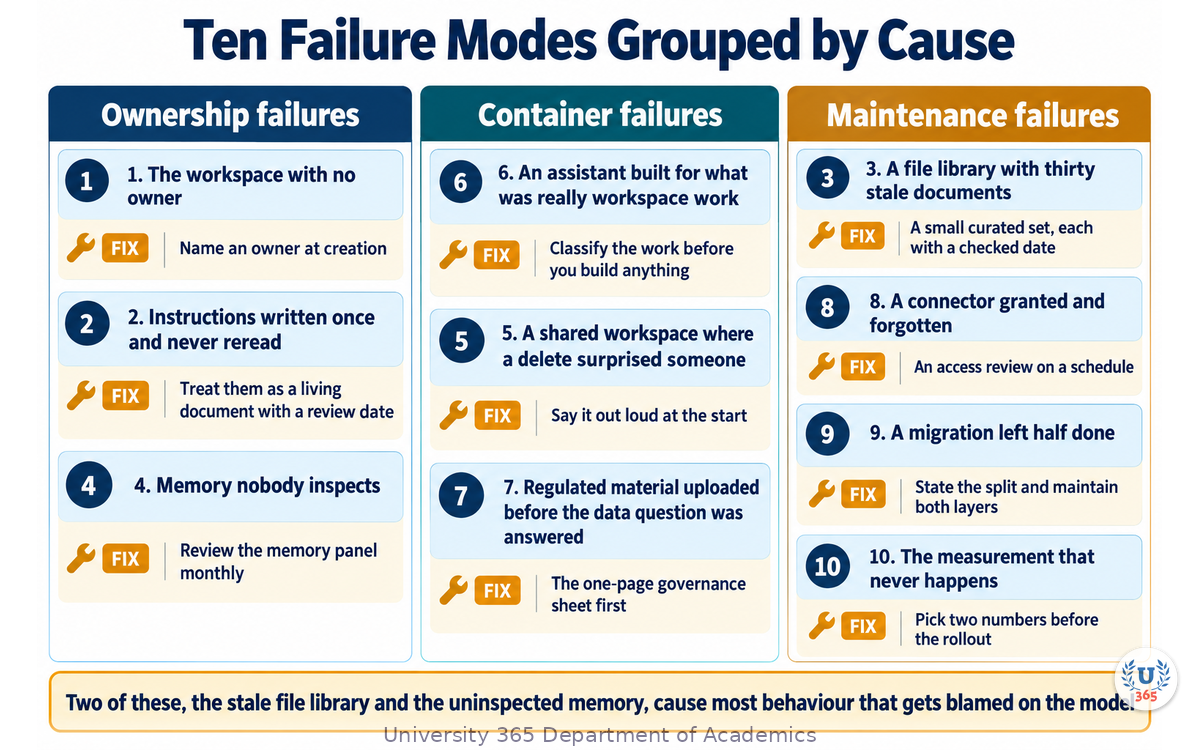
Ten Failure Modes, and How Each One Is Avoided
A list of the failures seen most often, with the fix for each. This is the section to come back to.
1. The workspace with no owner. It accumulates material and nobody is accountable. Fix: every workspace has a named owner at creation, and an owner change is part of any handover.
2. The instruction block written once and never read again. It drifts from how the work actually happens. Fix: review the instructions when the work changes, and treat them as a living document with a review date.
3. The file library with thirty stale documents. Retrieval pulls old material and competes with current material. Fix: a small curated set, each with an owner and a checked date.
4. Memory nobody inspects. A wrong remembered fact shapes every answer. Fix: a monthly review of the memory panel, as routine as checking your inbox.
5. The shared workspace where a delete surprised someone. Fix: say out loud, once, at the start, that deleting a file removes it for the whole team.
6. The assistant built for what was actually workspace work. It has no memory, and the users keep re-explaining. Fix: classify the work before you build anything, using the three piles.
7. The workspace opened for regulated material before the data question was answered. Fix: the one-page governance sheet, before the first upload.
8. The connector granted and forgotten. Access accumulates quietly. Fix: an access review on a schedule, not after an incident.
9. The abandoned migration half done. Some teams moved to workspaces and the assistants quietly rotted, or the reverse. Fix: a deliberate split, stated and written down, with both layers maintained.
10. The measurement that never happens. Nobody knows whether the change helped. Fix: pick two numbers before the rollout, such as time spent reconstructing context and correction rate, and read them after a month.
Two of those ten, the stale file library and the uninspected memory, account for the largest share of confusing behaviour that gets blamed on the model. Both are maintenance tasks, and both take minutes if they are scheduled.
Feynman Summary: Explain It Like You Are 12
Imagine you are working on a big school project for a whole term, and you have two different kinds of helper.
The first helper is a printed instruction sheet you hand out to everyone in your class. It says exactly how to write the project's introduction. Everyone follows the same sheet and every introduction comes out the same. That is useful when lots of people need to do the same thing the same way.
The trouble is that the sheet does not remember anything. If you ask it about what you did last week, it has no idea. It just follows the instructions every time, from scratch.
The second helper is a big folder with your name on it. Inside the folder you keep all your notes, your drafts, and a little notebook where your helper writes down important things it has learned about your project, like "the deadline is in March" or "the teacher wants sources listed at the end". Every time you sit down to work, you open the folder and the helper already knows everything in it.
That is the difference. The instruction sheet is for sharing one way of doing something with lots of people. The folder is for one big piece of work that grows over time.
The folder has one thing to watch. Whatever gets written in that notebook stays there, and if you share the folder, everyone in the group can read it. So you have to check the notebook sometimes and cross out anything wrong or anything you would not want the group to see.
So: sheets for sharing, folders for growing, and check the notebook.
Mindmap: The Complete Picture
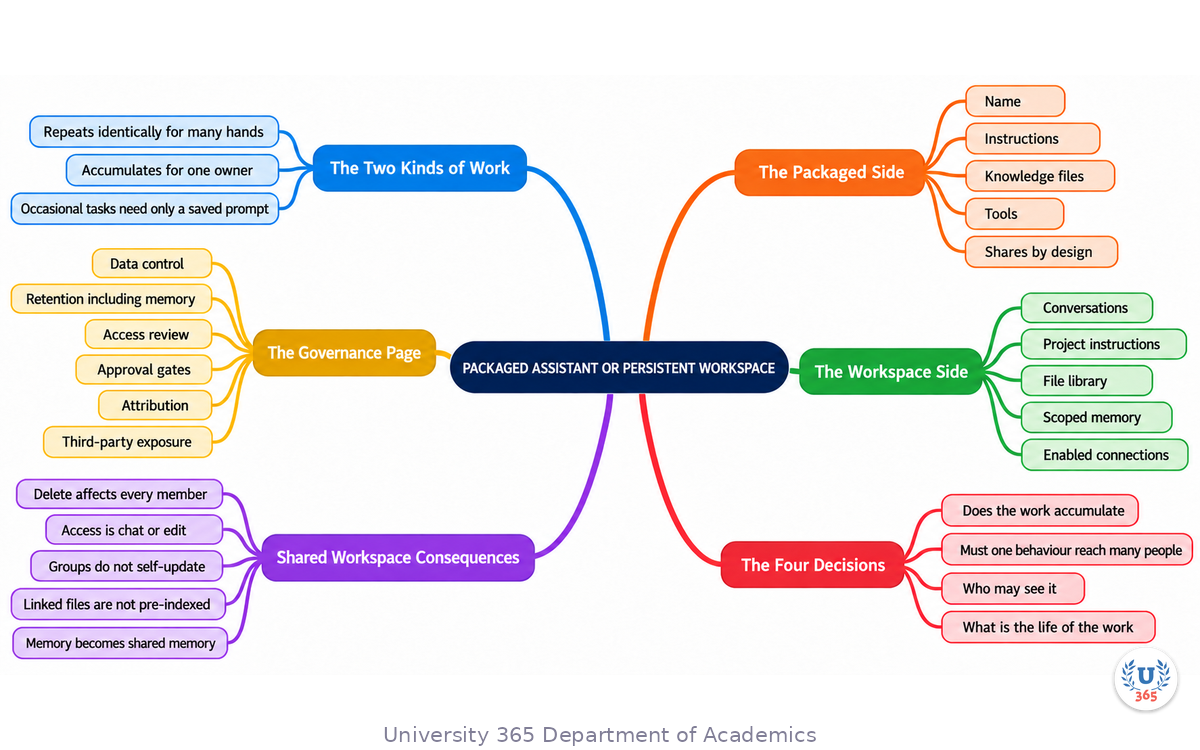
The mindmap is built around a single axis rather than a list. At the centre is the work itself, and the first ring splits it into two kinds: work that repeats identically for many hands, and work that accumulates for one owner. That split is the whole strategic decision.
From the repeating branch grows the packaged assistant, with its four parts: name, instructions, knowledge, tools. From the accumulating branch grows the persistent workspace, with its five parts: conversations, instructions, files, scoped memory, and enabled connections. A middle branch records the four decisions that settle the choice, and the governance constraint that sits underneath all of them.
The lower half of the map covers what a workspace brings with it. One wing is the shared workspace and its collective consequences: delete affects everyone, access comes in two shapes, groups do not self-update, linked files are not pre-indexed. The second wing is the governance page: data control, retention including memory, access review, approval gates, attribution, third-party exposure. The third wing is the institutional migration in four phases, and the fourth is the ten failure modes with their maintenance fixes.
Read the map outward from the centre to see how a strategic decision decomposes into operational tasks. Read it inward from the failure modes to see that almost every one of them traces back to a question that should have been answered at the start: whose work is this, who owns it, what happens when it ends, and who is allowed to see it.
UNOP Sound (University 365 Neuroscience Oriented Pedagogy)
Take five minutes to consolidate your memory. Play the isochronous tone track (10Hz alpha frequency) with your eyes closed. Alpha-frequency tones after a learning session support consolidation, helping move what you just learned from short-term to long-term memory.
[Audio player: UNOP Post-Lecture Isochrone (10Hz, 5 minutes)]
Practical Exercise: Classify Your Work and Open One Workspace Properly
This exercise takes about an hour and produces two things: a classification of your AI work, and one workspace built to the standard rather than improvised.
Part 1: The three piles (20 minutes)
List every AI-assisted task you or your team did in the last month. Then sort each into one of three piles.
Pile A, fixed process. The same job, the same output shape, done by more than one person. These belong in a packaged assistant or a reusable instruction set.
Pile B, accumulating work. A client, a project, a course, a report series, where what you did last week changes what you should do this week. These belong in a persistent workspace.
Pile C, occasional task. Something you do a few times a year, with no continuity needed. These need a saved prompt and nothing more.
Count the piles. Most people find Pile C is larger than they expected, and that half of Pile A was mislabelled and is actually Pile B.
Part 2: Open one workspace to the standard (25 minutes)
Choose the most valuable single item from Pile B and open a workspace for it. Do all six steps.
Name it by commitment, not by topic: the client, the project, the period.
Write the instruction block. Your role, how you want answers structured, what you already know, what you always want verified.
Choose at most five files, and note for each one its owner and the date you last checked it.
State the memory policy in one line. What is allowed to be remembered, and what is not. For anything confidential, say so explicitly.
Write the governance sheet. One page: purpose, owner, members, data classification, retention rule, enabled connections, approval points.
Set the review date. One month out, to inspect the memory panel and prune the files.
Part 3: Measure the baseline (15 minutes)
Before you use it, write down two numbers. How long does the task take you today, and how often does an output need correcting? Use a real recent example for both. These two numbers are the only honest way to know later whether the change helped.
What to Look For
Which pile contained the work you assumed was the other kind? That misclassification is the most common strategic error.
Did writing the instruction block reveal something about your own preferences you had never stated? That block is reusable everywhere.
Did the governance sheet raise a question you could not answer, such as where the data is stored? That question should be answered by the right person in your organisation before the workspace holds anything regulated.
Did you choose five files easily, or was the list long? If it was long, your knowledge set is not curated and retrieval will be unreliable.
Are the two baseline numbers measurable? If not, you will not be able to tell whether any of this worked.
Applied AI Connection
This exercise is the CI-First doctrine applied to structure rather than to a prompt. You decided what the work is, who owns it, what may be remembered, what may be acted upon, and how you will know whether it helped. Every one of those is a human decision that no model can make for you, and every one of them is what separates a workspace that scales from a folder that accumulates risk.
Glossary
Term | Definition |
Persistent workspace | A container holding related conversations, instructions, files, scoped memory and enabled connections for one body of work. |
Scoped memory | Facts a workspace retains and reads back in later conversations inside that workspace only, usually inspectable and editable. |
Workspace-only memory | A setting in which a shared workspace cannot see members' personal memories or personal instructions. |
Project instruction block | The instructions that apply automatically to every conversation started inside a workspace. |
File library | The reference documents held by a workspace and available to its conversations without re-uploading. |
Connected app | A pre-built integration giving an assistant or workspace access to an external service without custom code. |
Custom action | A builder-defined integration that calls a specific external API; it does not transfer through the current migration path. |
Plugin | The successor container named by the vendor, bundling reusable instructions with connected apps. |
Migration | Moving a packaged assistant into a successor container; instructions and connected apps transfer, custom actions and model choice do not. |
Retention | The rule governing how long content, including memory, is kept and when it is deleted. |
Access review | A scheduled check that the list of people who can reach a workspace is still correct. |
Approval gate | A defined point at which a human must authorise an action before the system takes it. |
Data classification | The label that says how sensitive a workspace's content is, which in turn sets who may access it and how it is stored. |
Context window | The maximum text a model can consider in one request, distinct from memory, which persists across requests. |
MCP | Model Context Protocol, an open standard for connecting models to external tools and data through a common interface. |
CI-First | Co-Intelligence First: the U365 principle that human intelligence orchestrates and AI amplifies. |
5M2S | 5 Minutes to Success: the U365 principle of starting with small, repeatable AI tasks and building from there. |
UNOP | University 365 Neuroscience-Oriented Pedagogy: the pedagogical framework behind all U365 lectures. |
Quiz: TEST YOUR UNDERSTANDING
1. Which problem does a persistent workspace solve that a packaged assistant cannot?
A) Continuity: related conversations, files and scoped memory persist across sessions for one accumulating body of work
B) Distributing one fixed behaviour to a large group of people
C) Publishing an assistant in a public directory
D) Reducing the number of knowledge files an assistant needs
2. In a shared workspace, what is the consequence of deleting a file?
A) It is removed for every member of the workspace
B) It is removed only for the person who deleted it
C) It moves to the other members' personal storage
D) It has no effect because shared files are read-only
3. Why should you review a workspace's memory panel regularly?
A) A wrong or stale remembered fact silently shapes every later answer, so it must be found and corrected
B) Memory costs money per stored item
C) Memory is deleted automatically each month
D) Memory is visible only to the workspace owner
4. A team of forty needs the same defined output from a fixed process. What is the correct container?
A) The packaged, distributable form, because distribution of one fixed behaviour is what it is for
B) A single shared workspace, because more people can be added to it
C) One personal workspace per person
D) A saved prompt document
5. Which of these belongs on the one-page governance sheet written before a workspace holds regulated material?
A) Data classification, retention rule including memory, enabled connections and the approval points
B) The list of prompts the team has saved
C) The model version currently in use
D) The number of tokens consumed to date
Answers: 1-A, 2-A, 3-A, 4-A, 5-A
Related Resources
U365 INSIDE Publications
GPTs Reborn: Why Custom Assistants Matter Again: the companion lecture on the packaged assistant, what it is for, and how to migrate one.
Mastering the Major AI Models: A Practical Guide: context against memory, and the model choices that sit under both containers.
How to Pick the Right AI Model Without the Headache: the decision procedure when the workspace workload grows.
Building an AI-First Company Culture: how these containers fit an organisation-wide adoption program.
External Resources
OpenAI API model directory: the current models available to run inside a workspace or an assistant: developers.openai.com
OpenAI platform documentation: current guidance on projects, memory and connected tools: platform.openai.com
OpenAI platform changelog: check the current retirement timeline for the packaged-assistant container and for any model you rely on: platform.openai.com
Model Context Protocol: the standard for the connectors a workspace relies on: modelcontextprotocol.io
Stanford AI Index: annual, independent reporting on AI capability and adoption: hai.stanford.edu
Related U365 Lectures
Other lectures in the Business AI Series at UIB, including Building an AI-First Company Culture and Automating Business Operations with AI Agents.
The Prompting 101 series, for the prompt structure that belongs in a workspace instruction block.
U.Copilot for This Lecture
Discuss this lecture with U.Copilot, your AI chat companion trained on this content.
Copy and paste the following prompt into the U.Copilot chat on university-365.com:
You are U.Copilot for Lectures, an AI chat companion specially trained on University 365 lecture content. You are helping a Fellow who just completed the lecture "From GPTs to Projects: A Strategic Guide for Individuals and Institutions" from the Business AI Series at the U365 Institute of Business (UIB). Your role is to help the Fellow apply the strategic decision to their own situation. You can: - Help them sort their AI work into the three piles: fixed process, accumulating work, occasional task - Walk through the four decisions that settle whether an assistant or a workspace is right - Explain what scoped memory is, how to inspect it, and what happens when it disagrees with the current conversation - Discuss the governance questions a shared workspace raises: data control, retention, access review, approval gates - Help draft the one-page governance sheet for a workspace they are about to open - Review a workspace's file set for staleness and conflicts, and its instruction block for drift Always maintain U365's CI-First approach: the human defines the boundaries and owns the decisions; the workspace holds the context the human chose to keep. Use the UP-Context-Engineering Method: provide context-rich, role-aware responses that account for the Fellow's learning level and goals.
Next Steps
Now that you have completed this lecture, here is what to do next:
Sort your AI work into the three piles and count them. The misclassified items are the finding.
Open one workspace properly, using all six steps from the practical exercise, rather than opening a folder and hoping.
Write the instruction block once and reuse it everywhere. It is the most reusable artifact in this lecture.
Write the one-page governance sheet before any regulated material goes near a shared workspace.
Review the memory panel monthly on every workspace you use, and prune the file library at the same time.
Join a UIB program if you want structured learning in business management and digital entrepreneurship: visit university-365.com/tuition.
The strategic point of this lecture is a distinction, not a product. Distribution and accumulation are different problems, and most people have both. The organisations that handle this well do not pick a winner between the two containers; they decide which job goes where, they standardise the frame, they write down the governance, and they keep the maintenance small enough that it actually happens.
IMPORTANT NOTICE
This lecture is published by University 365 as part of its INSIDE Publications Hub. The content is free to read for all visitors. Lectures in this series may be part of a structured academic program leading to a Micro-Credential for your Career (MCC). To enroll in an academic program, visit university-365.com/tuition.
This content is for educational purposes. While we strive for accuracy, AI is a fast-moving field: product names, features, limits and retirement dates change frequently. Verify current capabilities, storage terms and retention rules against the provider's own documentation before placing regulated or confidential material in a persistent workspace.
Copyright University 365, Inc. All rights reserved. This content is protected under University 365's copyright policies. For permissions or inquiries, contact uda@university-365.com.
Published by the Department of Academics, University 365.
Lecture delivered by the University 365 Institute of Business (UIB).
Denise Cromwell, Dean of Business, UIB
Signed for the academic year 2026.





Comments