
Mastering the Major AI Models: A Practical Guide

Updated: Oct 8

UIB University 365 Institute of Business
Series Business AI Series | Level Basic (Free)
Duration 25 minutes | Access Free
Business Management, Digital Entrepreneurship, Innovation, Finance, Leadership

UNOP Sound (University 365 Neuroscience Oriented Pedagogy)
Take five minutes to prepare your brain. Play the isochronous tone track (40Hz gamma frequency) with your eyes closed. Gamma-frequency tones before a learning session raise attention and make the material easier to absorb.
[Audio player: UNOP Pre-Lecture Isochrone (40Hz, 5 minutes)]
In this Lecture

The Hook: Your Question, Answered
You have read the headlines. A new model every few weeks, each one described as the most capable yet, each one accompanied by a chart where the bars get taller. You have probably tried two or three of them, formed an impression from a handful of prompts, and then gone back to whichever one you were already using because the difference was not obvious.
That experience is normal and it is not a failure of attention. The differences between the major models are real, but they are not spread evenly across everything the models do. They cluster tightly around specific capabilities, and if your handful of test prompts did not touch those clusters, the models genuinely looked the same to you.
This lecture is the map. It explains what each major family of models is actually good at, where each one predictably fails, what the settings under the surface actually control, and how to read a model card without being persuaded by it. It is the companion to the model selection lecture: that one gives you the decision procedure, this one gives you the understanding the procedure assumes.
You will learn to use AI deliberately here, in five minutes of practical work and twenty of structured reading. You direct. The model executes. This is the CI-First approach: human intelligence orchestrates, AI amplifies.
The Families You Will Actually Meet
It helps to stop thinking in version numbers and start thinking in families, because families persist while version numbers churn every few months.
The general flagship family. Every major vendor maintains a flagship line intended for professional work: the best overall model that vendor can offer at that moment. OpenAI's current directory lists its flagship families under the GPT-5.6 and GPT-6 names. Anthropic maintains the Claude line. Google maintains Gemini. A flagship family is characterised by broad competence, a long context window, support for tools and files, and a price that reflects all of it.
The balanced mid-tier. Alongside the flagship sits a model that balances intelligence against cost, usually at a fraction of the flagship price with a modest drop in capability. This tier is where most production work belongs, and it is the tier most often skipped by teams who jump straight to the flagship out of caution.
The efficient tier. The cheapest and fastest member of the family, built for cost-sensitive, high-volume work. It is the tier for classification, extraction, formatting, and simple transformation of text at scale.
The specialised coding and agentic line. Vendors now ship models trained specifically for long-horizon software development and tool use. This is a genuinely different skill from answering questions well, and it is the reason a coding model can outperform a flagship on a repository-scale refactor.
The image generation line. Models built for creating and editing images, usually with their own tiers for speed against capability. Text rendering quality is the single most practically important difference between them for business use, because a diagram with illegible labels is worse than no diagram.
The speech, transcription and realtime line. Models for converting speech to text, text to speech, and holding a low-latency spoken conversation. These are chosen by output format and latency, not by reasoning ability.
The embedding and retrieval models. Less visible but load-bearing. An embedding model converts text into vectors so a system can find relevant passages later. If you build any retrieval system, the embedding model is a real decision, and it is invisible in every chat comparison.
Two names sit across those families rather than beside them: the multimodal systems that accept images, audio and documents alongside text, and the reasoning mechanisms that several families now carry as a setting rather than as a separate model.
One caution about reading this section later. The families are stable, the version numbers are not. The names above are the ones live on 1 October 2026. What you should retain is the shape of the market: a flagship, a balanced tier, an efficient tier, plus specialist lines for code, images, speech and retrieval. That shape has held for two years and is likely to hold for the next two.
What Each Family Is Good At, and Where It Fails
The useful question is never "which is better". It is "what does this one do well, and what does it predictably do badly". Here is that answer for the tiers you will actually use.
The efficient tier. It is excellent at tasks with a defined output: classify this message into one of six categories, extract these nine fields into a table, rewrite this paragraph at a ninth-grade reading level, translate this passage, convert this unstructured text into a defined schema. On these tasks it is often indistinguishable from a flagship, at a small fraction of the cost, and it is fast enough to run inside an interactive product. Where it fails is on tasks that require holding a complex argument together: a long analysis with dependencies, a strategy with trade-offs, a document whose sections must not contradict each other. It fails quietly, producing fluent prose that reads correctly and is not.
The balanced tier. This is the production workhorse. It handles substantial reasoning, follows elaborate formatting instructions, works reliably with tools, and stays coherent across a few thousand words. Its failures cluster around the genuinely hard cases: novel problems with no precedent in its training, arithmetic and quantitative reasoning at the edge of its ability, and long-horizon tasks where an early small error compounds. The right posture with this tier is to give it real work and check the result on the cases where the answer matters.
The flagship tier. It is better at exactly the things the mid-tier struggles with, and the margin is largest on reasoning depth, following complex constraints, and handling ambiguity. It is not immune to the failure modes: it will still hallucinate a citation, misread a table, or confidently assert something false. The difference is that its errors are usually in harder territory, which means they are harder for you to catch. A flagship answer deserves more scrutiny, not less, because it is more persuasive.
The specialist coding line. Excellent at reading and modifying a codebase, planning a multi-file change, and running tools. Its failures are typically about scope: it may make a change that is locally correct and globally wrong, or solve the stated problem while breaking an unstated assumption. It also needs a real test suite, because its confidence is not evidence.
The image generation line. The differences that matter in business use are text rendering, composition control, and consistency between images. A model that draws beautiful scenes but cannot render a legible five-word label is not usable for a diagram. Test it on your actual use case rather than on portraits.
The speech and realtime line. Judged almost entirely on latency and on robustness to real audio: accents, background noise, interruptions, and people talking over each other. A transcription model with better accuracy but a two-second delay is worse than a slightly less accurate one that responds instantly in a live conversation.
The embedding line. Judged by retrieval quality on your own documents, which is measurable and is often surprisingly different from what the leaderboards suggest. A retrieval test is the cheapest useful evaluation in applied AI: take fifty questions you know the answers to, and measure whether the right passage comes back in the top five results.
The pattern across all of these is the same. Every model is good at the shape of task it was trained for and weak outside it, and the weakness is usually in the direction of confident fluency rather than obvious error. Knowing which direction each tier fails is more useful than knowing its score.
The Reasoning Dial, Explained Without Hype
The biggest change in how models work over the last two years is not a new capability. It is that thinking became something you configure rather than something you switch to.
Older model families came in pairs: a fast model that answered immediately, and a separate reasoning model that thought first. You chose between them by picking a different name. Modern families collapsed those into one model with a setting that controls how much internal reasoning it does, and vendor documentation describes this as configurable reasoning effort.
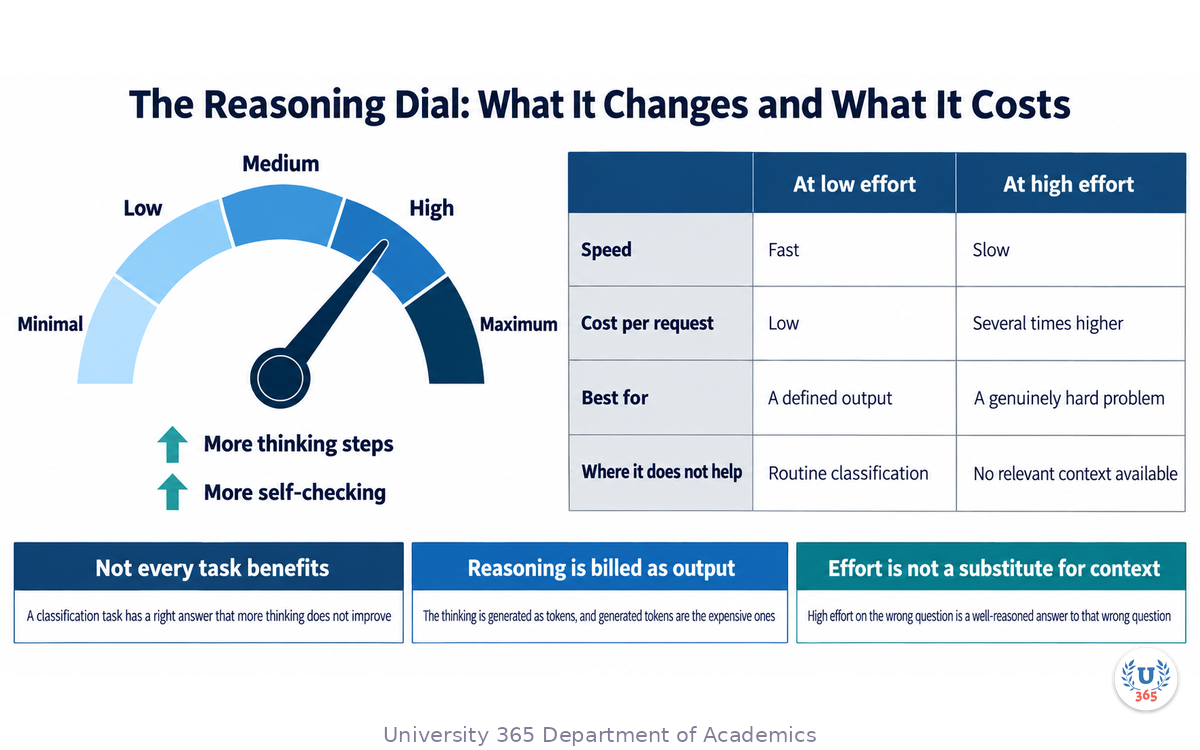
What the setting actually changes is the amount of thinking the model does before answering. At low effort, it responds quickly and cheaply and behaves much like a fast model. At high effort, it works through the problem in more steps, checks itself more often, and produces a better answer on genuinely hard problems, at the cost of time and tokens. Higher effort does not simply make the model smarter; it makes the model spend more of its capacity on the problem.
Three practical consequences follow, and they are the ones that matter.
Not every task benefits. A classification task has a right answer that does not improve with more thinking. Setting high effort on it burns tokens for nothing and adds latency a user will notice. Match the effort to the task, not to your ambition.
The cost is real and it is on the output side. Reasoning is generated as tokens, and generated tokens are the expensive ones. A single hard request at high effort can cost many times what the same request costs at low effort, even though the visible answer is a similar length.
Effort is not a substitute for context. A model with high reasoning effort and no relevant information will produce a well-reasoned answer to the wrong question. Effort improves processing, not knowledge. If the model needs your data, giving it the data matters more than raising the dial.
One habit follows from all three. Set effort by task class, write the setting down, and revisit it only when the results tell you to. The teams that get the most from reasoning models are the ones that treat the dial as an engineering parameter rather than as a quality slider they leave at maximum.
Context, Memory and the Difference Between Them
Two words get used interchangeably and should not be. Confusing them leads to designs that fail for reasons nobody can explain.
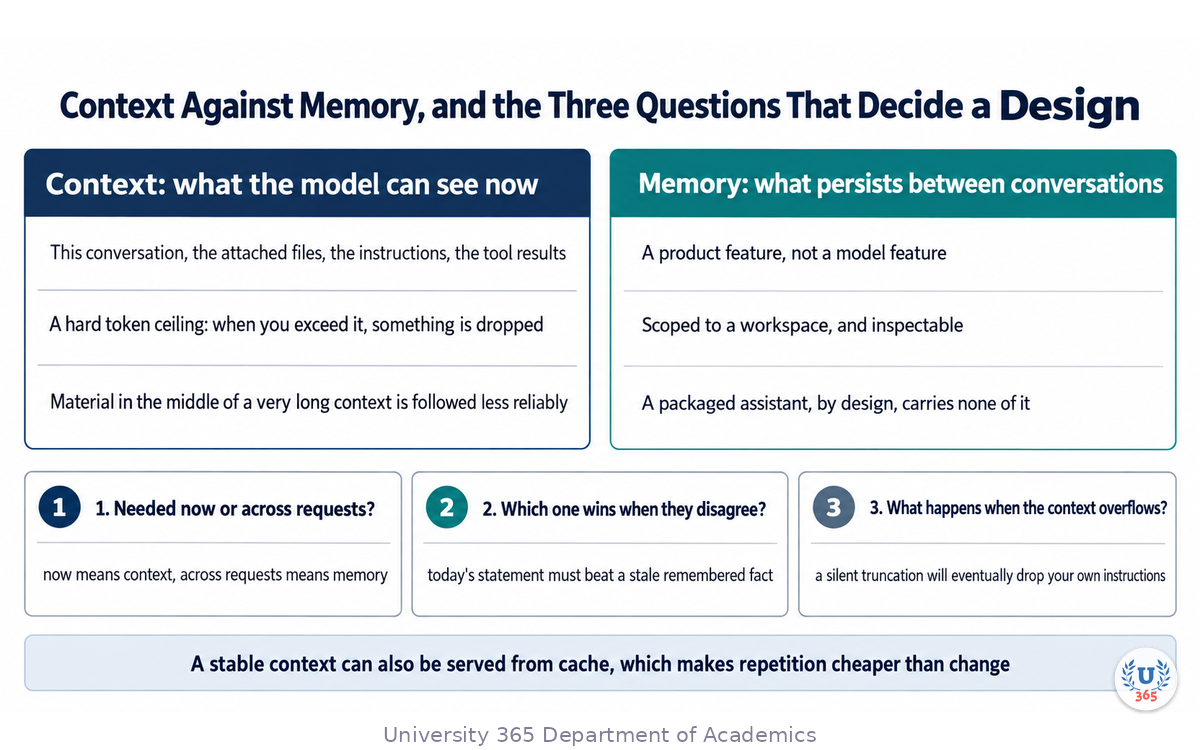
Context is what the model can see in this request. It is the conversation so far, the files you attached, the instructions you set, and anything a tool returned. A context window is the maximum size of that, measured in tokens, and it is a hard boundary. When you exceed it, something gets dropped, and what gets dropped is decided by the system, not by you. A model with a larger context window can accept more at once, but a larger window does not mean the model uses all of it equally well: in practice, material in the middle of a very long context is followed less reliably than material at the beginning or the end.
Memory is what persists between separate conversations. It is a feature of the product, not of the model, and it works differently in every product. A chat assistant may keep a set of remembered facts about you. A project workspace may keep remembered facts scoped to that project only. A custom assistant configuration, in the classic GPTs sense, generally does not carry memory between separate conversations at all: each chat starts from the instructions and the knowledge files and nothing else.
Why the distinction matters in practice comes down to three questions you should ask before designing anything.
First, does the system need to know something in this request, or across requests? If across requests, you need memory, and you need to know exactly where that memory lives and whether you can inspect it.
Second, what is authoritative when memory and the current message disagree? A remembered fact from three months ago that contradicts what the user says today should lose, and you should know whether your system does that.
Third, what happens when the context overflows? A tool that silently truncates the oldest part of a conversation will eventually lose the instructions you set at the start of it, and the failure will look like the model ignoring you.
A design that answers those three questions explicitly is dramatically more predictable than one that treats context and memory as the same thing. It is also cheaper, because a stable context that repeats between calls can be served from cache, while a changing one cannot.
Tools, Connectors and the Model Context Protocol
A model on its own knows what it was trained on. Everything else, your files, your calendar, your database, your codebase, has to be given to it, and there are now three distinct ways to do that.
Tools and function calling. You describe a function the model may call, with its name, its purpose and its parameters, and the model asks to call it. Your code runs the function and returns the result, and the model continues. This is the mechanism behind almost every useful agent. It is also where most agent failures occur, because a tool whose description is vague will be called with the wrong arguments.
Connectors. Pre-built integrations that expose a service's data or actions to the model without you writing the function yourself. A connector is faster to set up and less flexible than a custom tool, and the trade is usually worth it for common services.
The Model Context Protocol. An open standard that defines how a model reaches external tools and data sources through a common interface, so a tool written once can be used by many different assistants and products. Adoption across the major vendors has been rapid, and by 2026 it is the default way to connect an assistant to an external system. For a business, its value is architectural: it reduces the work of switching assistant platforms, because the connections move with you rather than being rewritten.
Three rules follow for anyone building with tools.
Write the tool description as carefully as you would write an API document for a new colleague, because that description is the model's only documentation. State what the function does, when it should be called, what the parameters mean, and what it returns.
Make failure visible. Every tool call should be logged with its arguments and its result, and a failed call should surface rather than being silently retried until the budget runs out. An agent whose failures are invisible is an agent you cannot put near anything important.
Give the model the smallest useful set of tools. A model choosing between three well-described tools is far more reliable than the same model choosing between thirty, several of which overlap.
The CI-First rule applies here as directly as anywhere. A tool is an action taken on your systems. Define who or what authorises that action, and put a human approval in the path of anything irreversible.
Multimodal Work: Vision, Audio and Image Generation
Multimodal means the model accepts more than text. In 2026 that is normal rather than remarkable, and the interesting question has moved from whether a model can read an image to how reliably it does so on the material you actually have.
Reading documents. The most valuable multimodal capability in business is not reading photographs. It is reading documents: invoices, contracts, forms, scanned reports, screenshots of spreadsheets. A vision-capable model can extract structured data from a page image, which turns a paper process into data without an OCR pipeline. Two cautions. First, test on your own worst documents, because models that handle clean printed pages well can struggle with faint scans, handwriting, stamps, and multi-column layouts. Second, always validate a sample against the source: extraction errors are silent and accumulate.
Reading screens and interfaces. A model that can see a screenshot can operate software. This is the basis of computer-use agents, and the important property is not visual understanding in general but precision: reading small text, recognising the difference between two similar buttons, and recovering when the screen is not what it expected. Judge a computer-use model on a real workflow with unexpected states, not on a clean demo.
Charts and diagrams. A vision model can describe a chart, but describing is not reading values off it. If you need numbers from a chart, a text-based process over the underlying data is more reliable than asking a model to eyeball the axis.
Generating images. Image generation has its own tiers, and the practically important one for business use is text rendering. A model that can place legible labels inside a diagram makes infographics, annotated screenshots, and structured visuals possible. A model that cannot is limited to decorative work. If your use case involves labels, numbers or diagrams, test that specifically before committing.
Speech in both directions. Transcription turns recorded speech into text, with accuracy varying by accent, audio quality, and how many people are speaking at once. Text to speech turns text into audio, where the meaningful difference is naturalness and the ability to control emphasis. Realtime models hold a spoken conversation with low enough latency to feel like a conversation rather than a recording being processed.
The composition rule. Multimodal work is usually a pipeline rather than one model doing everything. A common and effective design transcribes audio with a speech model, extracts the structure with a text model, generates any images with an image model, and assembles the result with your own code. Each step uses the model built for it, and the pipeline is easier to debug than a single model asked to do all of it.
The governing principle is the same one that runs through this whole lecture: choose the model for the shape of the task, and do not assume that the most impressive general model is the right tool for a specialised output.
The Specialist Lines: Coding, Agentic and Computer Use
Three specialist lines deserve their own section, because they are chosen by criteria that general benchmarks do not measure.
Coding models. Trained on code and on the process of working through a repository, these models are measurably better than general flagships at reading a codebase, planning a multi-file change, and producing a patch that fits the existing conventions. Vendor documentation now describes dedicated agentic coding models as the most capable option for this work, and treats them as a distinct line rather than as a variant of the flagship. If you are choosing a model to write software, general chat benchmarks are the wrong evidence. The right evidence is your own repository, your own tests, and a real task.
Agentic models. An agent needs three things a chat model does not: reliable tool calling, coherent planning across many steps, and recovery from errors. Models trained for agentic work are better at all three, and the difference shows up on long tasks rather than short ones. When you evaluate an agentic model, give it a task with at least eight steps and one deliberate obstacle, such as a tool that returns an error on the first call. Watch how it recovers.
Computer-use models. A model that operates a graphical interface by looking at the screen and issuing mouse and keyboard actions. The practical limits are precision on small targets, handling unexpected dialogs, and knowing when to stop and ask. Do not evaluate these on a demo; evaluate on the workflow that annoys your team most, including the states the demo never shows.
A note that applies to all three. Specialist models are usually chosen for a system rather than for a person, which means the evaluation needs to be a system test. Run the whole job, measure the end result, and count the interventions a human had to make. That last number is the one that decides whether the system is useful, and it is the one that no public benchmark reports.
Reading a Model Card Without Being Fooled
A model card is the vendor's own summary of a model. It is useful and it is marketing, and the skill is knowing which parts to read carefully.
Read the context window and the output ceiling. These are hard numbers and they are honest. The context window tells you what fits in a request, and the maximum output tells you the longest answer you can receive. Both matter and neither is a quality claim.
Read what the model does not support. Every card has a list of limitations or unsupported features. This is where the genuinely useful information sits: which languages, which modalities, which tool formats, which structured-output guarantees. A limitation you do not read about is a limitation you discover in production.
Read the date. A model card describes a snapshot. The behaviour behind a model name can change through updates, and a card from eighteen months ago is a historical document. Check when it was last revised.
Be sceptical of benchmark tables in the card itself. A vendor choosing which benchmarks to publish is a selection decision, and it is made by people who want the model to look good. The numbers are usually accurate and the choice of what to show is editorial.
Ignore price-per-token comparisons made across different token accounting. A cheap model that uses twice as many tokens to reach an answer is not cheap. Compare on the cost of a finished task, not on the cost of a token.
Look for the reasoning and tool-use sections specifically. If your work involves either, those sections matter more than the general capability summary, because they describe the behaviours that decide whether a system works.
Two documents are worth bookmarking for any vendor you rely on: the current model list and the release notes. The first tells you what exists today; the second tells you what is being retired and when. Together they answer most of the questions a model card raises.
Benchmarks, and What They Cannot Tell You
Public benchmarks exist for a good reason: they give a rough, standardised way to compare models, and they are the reason you can rule out a model that is far behind. They are not, however, a proxy for your work, and treating them as one leads to expensive mistakes.
Four limits are worth understanding.
The tasks are the benchmark author's. A benchmark measures performance on problems selected to be measurable, which selects against the messy, ambiguous work that fills a real job. A model can top a mathematics benchmark and still write a poor client email.
Contamination is real. If a benchmark's test questions appeared in training data, the score measures recall rather than reasoning, and neither the vendor nor you can fully rule this out for a public test set.
The scoring may not match your definition of correct. A benchmark may score a plausible but unsupported answer as correct if it matches the reference text, while you would call that answer a defect because it invented a source.
Averages hide the tail. A score of eighty percent says nothing about what the twenty percent looks like. For your work, the shape of the failures is the whole question.
The constructive conclusion is not to ignore benchmarks. Use them to eliminate candidates, never to select one. Shortlist two or three models that are close on public measures, then decide with your own twenty tasks, scored blind against criteria you wrote before you looked at any output. That process is described in full in the companion lecture, and it takes an afternoon.
One further habit is worth the effort. Keep the evaluation set after the decision. When a model is updated or retired, the set turns a disruptive event into a short, measurable comparison, and you find out whether the change hurt you before your users do.
Feynman Summary: Explain It Like You Are 12
Imagine a big library of helpers, and each helper is good at one thing.
Some helpers are very fast and not very deep. Give them a pile of notes and they will sort it perfectly in a second. Ask them to explain why a story ends the way it does, and they will give a short answer that sounds fine but does not really explain anything.
Some helpers are slower and think properly. Give them a hard question and they will work through it and come back with an answer that holds together. They cost more, because you are paying for the thinking.
Some helpers are the best in the library. You save them for the question that really matters.
Some helpers are not for answering questions at all. One draws pictures. One listens to people talking and writes down what they said. One is very good at fixing computer code and quite ordinary at everything else. One is invisible: it does not answer you, it just finds the right page in a giant book so another helper can read it.
Two more things to know. First, the ones that think have a dial. Turn the dial up and they think longer and get harder things right, but they are slower and you pay more. Turn it down and they answer fast, which is fine for easy things. Second, there is a difference between what a helper can see right now and what a helper remembers later. What it can see right now is like the page you put in front of it. What it remembers later is like a note it keeps in a drawer. Those are different, and confusing them is how things go wrong.
That is the whole lecture. Different helpers, different jobs, and you are the one who decides which to ask.
Mindmap: The Complete Picture
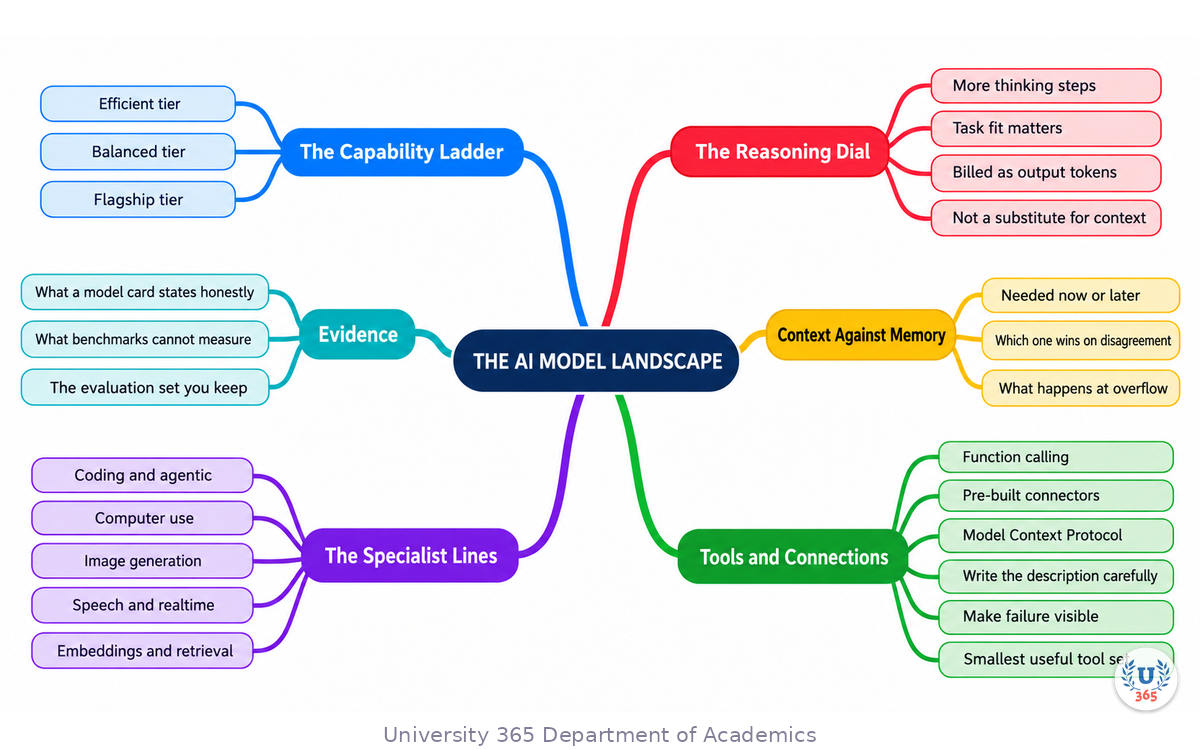
The mindmap puts the whole landscape on one page. At the centre is the family, not the version number, because families persist while numbers change. Six main branches radiate from it. The first branch is the capability ladder: the efficient tier, the balanced tier, and the flagship. The second is the reasoning dial, with its three consequences being task fit, output-side cost, and the fact that effort cannot replace context. The third branch is context against memory, resolved by the three design questions: does the system need to know this now or later, what wins when the two disagree, and what happens when the context overflows.
The fourth branch is tools and connections, splitting into function calling, pre-built connectors, and the Model Context Protocol, with the three build rules underneath: write the description carefully, make failure visible, and expose the smallest useful set of tools. The fifth branch is the specialist lines, covering coding, agentic work, computer use, images, speech, and retrieval. The sixth branch is evidence: what a model card tells you honestly, what a benchmark can and cannot measure, and the evaluation set you keep for the next version change.
Read the map as a set of nested choices. Pick the family by the shape of your task. Set the reasoning dial by the difficulty of the task. Get the context and the tools right before you consider a bigger model. Keep evidence, not impressions.
UNOP Sound (University 365 Neuroscience Oriented Pedagogy)
Take five minutes to consolidate your memory. Play the isochronous tone track (10Hz alpha frequency) with your eyes closed. Alpha-frequency tones after a learning session support consolidation, helping move what you just learned from short-term to long-term memory.
[Audio player: UNOP Post-Lecture Isochrone (10Hz, 5 minutes)]
Practical Exercise: Build Your Own Model Profile
This exercise takes about thirty minutes and produces something you will use repeatedly: a written profile of which model you use for which job, and why.
Part 1: Inventory your recurring AI work (10 minutes)
List every task you did with an AI model in the last two weeks. Aim for ten to fifteen items and be specific rather than tidy: "drafted the weekly update email", "summarised three competitor pages", "reviewed a supplier contract", "wrote a SQL query", "cleaned a contact list". For each one, note roughly how long it took and how you would have known if the answer was wrong.
Part 2: Group them by shape (10 minutes)
Now group the list into four piles using these questions. Which of them produce text you will read and edit? Which produce structured data or a transformation of data? Which require reasoning about a problem rather than producing content? Which produce something that is not text, such as an image, a file, or an action in another system?
Write one sentence per pile naming the tier you think fits. You now have a model profile rather than a model preference.
Part 3: Test one pile properly (10 minutes)
Choose the pile with the most items, and run five real examples from it through the model you named. Before reading the outputs, write one sentence on what makes an answer unacceptable. Score only against that sentence.
If all five pass, keep the choice. If any fail, decide whether the failure is about reasoning or about your instructions, because the fix is different. Reasoning failures justify a higher tier. Instruction failures justify a better prompt, and moving tiers would hide them.
What to Look For
Did the pile you expected to be hard turn out to be easy? Most people overestimate their routine work.
Did any failure involve an invented number, source or fact? Treat that as a defect in any tier.
Which model did you use by habit rather than by decision? That habit is the thing this exercise is designed to replace.
Did the reasoning dial matter at all on your tasks? For many jobs it does not, and knowing that saves money.
Is there a task in your list that does not need a text model at all, such as a transcription or a diagram? Those are the ones most often sent to the wrong tool.
Applied AI Connection
This exercise produces the document that makes the companion lecture's decision procedure repeatable. You have defined what correct means, tested against real work, and written down why. That is the CI-First pattern at personal scale: the human defines the standard, the model produces candidates, the judgment stays with you. Applied across a team, the same artifact becomes the routing policy that decides which requests reach which tier.
Glossary
Term | Definition |
Flagship model | A vendor's most capable general model line, for professional work at the highest price and often the highest latency. |
Balanced tier | The model line that trades some capability for a much lower price, and where most production work belongs. |
Efficient tier | The cheapest, fastest model line, intended for high-volume work with a well-defined output. |
Reasoning effort | The setting that controls how much internal thinking a model does before answering, trading latency and cost for accuracy. |
Context window | The maximum amount of text, measured in tokens, that a model can consider in a single request. |
Token | The unit models read and write in, roughly a word or part of a word. Pricing and limits are expressed in tokens. |
Memory | Product-level persistence of information across separate conversations, unlike context, which exists only within one request. |
Function calling | The mechanism by which a model requests that a defined function be executed, and uses the result in its answer. |
Connector | A pre-built integration that exposes an external service's data or actions to an assistant without custom code. |
MCP | Model Context Protocol, an open standard for connecting models to external tools and data through a common interface. |
Multimodal | A model that accepts more than one kind of input, such as text together with images or audio. |
Embedding model | A model that converts text into vectors so a system can retrieve relevant passages later. |
Computer use | A model's ability to operate a graphical interface by reading the screen and issuing mouse and keyboard actions. |
Agent | A system that loops through plan, act, observe and decide, calling tools until the goal is met or a budget is exhausted. |
Model card | The vendor's own published summary of a model, including its limits, supported features and benchmark results. |
Contamination | The situation where a benchmark's test items appeared in a model's training data, so the score measures recall rather than reasoning. |
CI-First | Co-Intelligence First: the U365 principle that human intelligence orchestrates and AI amplifies. |
5M2S | 5 Minutes to Success: the U365 principle of starting with small, repeatable AI tasks and building from there. |
UNOP | University 365 Neuroscience-Oriented Pedagogy: the pedagogical framework behind all U365 lectures. |
Quiz: TEST YOUR UNDERSTANDING
1. Which tier is the best fit for extracting nine defined fields from a thousand invoices?
A) The efficient tier with structured output, validated on a sample against the source
B) The flagship tier, because the task is important
C) An image generation model
D) An embedding model
2. What does raising reasoning effort actually change?
A) The amount of internal thinking the model does before answering, trading latency and tokens for accuracy on hard tasks
B) The size of the model's knowledge base
C) The model's access to your files
D) The number of tools the model may call
3. What is the difference between context and memory?
A) Context is what the model can see in the current request; memory is information a product persists between separate conversations
B) Context is stored permanently and memory only lasts one request
C) They are two names for the same mechanism
D) Context applies to images and memory applies to text
4. Why should a public benchmark be used to eliminate candidates rather than to select one?
A) Its tasks are the author's, contamination is possible, its scoring may not match your definition of correct, and averages hide the failure tail
B) Because benchmarks are usually fabricated
C) Because they only cover open-source models
D) Because they always favour the newest model
5. What should you check in a model card before relying on a model for a diagram with labels?
A) Whether it supports text rendering well enough to place legible labels, tested on your own use case
B) Its score on a general reasoning benchmark
C) The number of languages it supports
D) Its release date alone
Answers: 1-A, 2-A, 3-A, 4-A, 5-A
Related Resources
U365 INSIDE Publications
How to Pick the Right AI Model Without the Headache: the companion lecture that gives you the decision procedure these families feed into.
GPTs Reborn: Why Custom Assistants Matter Again: what a packaged assistant is, and when it beats a plain chat.
From GPTs to Projects: A Strategic Guide for Individuals and Institutions: how persistent workspaces change the way models are used.
Building an AI-First Company Culture: how model understanding translates into organisational practice.
External Resources
OpenAI API model directory: the authoritative current list of available models and their documented limits: developers.openai.com
OpenAI platform documentation: prompting, reasoning and function-calling guides: platform.openai.com
Model Context Protocol: the specification and an introduction to connecting models to tools and data: modelcontextprotocol.io
Anthropic, introducing the Model Context Protocol: the original announcement of the standard: anthropic.com
Stanford AI Index: annual, independent reporting on model capability and adoption: hai.stanford.edu
Related U365 Lectures
Other lectures in the Business AI Series at UIB, including Automating Business Operations with AI Agents and AI for Sales Forecasting.
The Prompting 101 series, for the prompt structure that lets a cheaper model perform above its tier.
U.Copilot for This Lecture
Discuss this lecture with U.Copilot, your AI chat companion trained on this content.
Copy and paste the following prompt into the U.Copilot chat on university-365.com:
You are U.Copilot for Lectures, an AI chat companion specially trained on University 365 lecture content. You are helping a Fellow who just completed the lecture "Mastering the Major AI Models: A Practical Guide" from the Business AI Series at the U365 Institute of Business (UIB). Your role is to help the Fellow build an accurate mental model of the AI landscape. You can: - Explain the difference between the efficient, balanced and flagship tiers in plain language - Walk through what the reasoning effort dial changes, and when it does not help - Clarify the difference between context and memory, and why the distinction changes a design - Explain function calling, connectors and the Model Context Protocol, and when each is the right choice - Discuss multimodal work, including reading documents, operating an interface, and generating images with legible labels - Help the Fellow read a model card critically and design a small evaluation for their own work Always maintain U365's CI-First approach: the human sets the standard, the model produces candidates, and judgment stays with the person. Use the UP-Context-Engineering Method: provide context-rich, role-aware responses that account for the Fellow's learning level and goals.
Next Steps
Now that you have completed this lecture, here is what to do next:
Build your model profile with the practical exercise, grouping your real work into the four shapes.
Test the largest pile on five real examples and record what unacceptable looks like.
Read a model card for a model you use, and find its limitations section. Most people have never read it.
Set up one tool or connector so a model can reach data you currently paste by hand.
Join a UIB program if you want structured learning in business management and digital entrepreneurship: visit university-365.com/tuition.
The understanding this lecture gives you is durable in a way that model names are not. Families, tiers, the reasoning dial, context against memory, tools, and the difference between elimination and selection: those hold whether the current flagship is called one thing or another. Learn the shape of the landscape once, and each new release becomes a small update rather than a fresh education.
IMPORTANT NOTICE
This lecture is published by University 365 as part of its INSIDE Publications Hub. The content is free to read for all visitors. Lectures in this series may be part of a structured academic program leading to a Micro-Credential for your Career (MCC). To enroll in an academic program, visit university-365.com/tuition.
This content is for educational purposes. While we strive for accuracy, AI is a fast-moving field: model names, prices and capabilities change monthly. Verify current model availability and capability against the provider's own documentation before making a procurement or architecture decision.
Copyright University 365, Inc. All rights reserved. This content is protected under University 365's copyright policies. For permissions or inquiries, contact uda@university-365.com.
Published by the Department of Academics, University 365.
Lecture delivered by the University 365 Institute of Business (UIB).
Denise Cromwell, Dean of Business, UIB
Signed for the academic year 2026.





Comments