
GPTs Reborn: Why Custom Assistants Matter Again

Updated: Oct 8

UIB University 365 Institute of Business
Series Business AI Series | Level Basic (Free)
Duration 25 minutes | Access Free
Business Management, Digital Entrepreneurship, Innovation, Finance, Leadership

UNOP Sound (University 365 Neuroscience Oriented Pedagogy)
Take five minutes to prepare your brain. Play the isochronous tone track (40Hz gamma frequency) with your eyes closed. Gamma-frequency tones before a learning session raise attention and make the material easier to absorb.
[Audio player: UNOP Pre-Lecture Isochrone (40Hz, 5 minutes)]
In this Lecture

The Hook: Your Question, Answered
In late 2023 you could build a small custom assistant in an afternoon: give it a name, write it instructions, attach a few reference files, and share it with your team by link. People built thousands of them. Many of those assistants are still in daily use, quietly doing a defined job for a defined group of people.
Then the platform moved on. New models arrived, projects appeared, and the custom assistant looked like a solved and slightly dated idea. And yet the pattern will not die, because the problem it solves will not go away: how do you hand one repeatable job to forty people and know that each of them gets the same behaviour?
That is the question this lecture answers. And it answers it honestly, including the part that is inconvenient: the specific OpenAI implementation of the custom assistant, the GPT, is being retired. OpenAI's published timeline ends new GPT creation for Enterprise workspaces and schedules GPTs to stop running in December 2026, with plugins named as the replacement, and the company says other plans may follow the same timeline.
So why does the title of this lecture say they matter again?
Because the pattern is being reborn in a different container. A packaged, reusable assistant with fixed instructions, attached knowledge, and defined tools is exactly what the replacement products are: plugins that bundle reusable instructions with connected apps, and workspace agents that carry a shared workflow. The name on the box is changing. The engineering idea inside it is not, and learning that idea is what makes the migration a small job rather than a rebuild.
You will learn to use AI deliberately here, in five minutes of practical work and twenty of structured reading. You direct. The assistant executes. This is the CI-First approach: human intelligence orchestrates, AI amplifies.
What a Custom Assistant Actually Is
Strip away the product names and a custom assistant has four parts. Understanding them is what lets you judge any implementation, present or future.
A name, so people can find it and refer to it. Trivial, and it matters more than it sounds: an assistant nobody can describe to a colleague is an assistant nobody uses.
Instructions. A block of text that sets the role, the task, the constraints, the tone, and the boundaries. Every conversation with the assistant starts from these. They are the assistant's definition of itself.
Knowledge files. Reference material the assistant can draw on: a policy document, a style guide, a product catalogue, an FAQ. The files define what the assistant knows beyond general training.
Tools and connected apps. External capabilities the assistant may use: a search, a database, an API, a connected service. This is the part that turns an assistant that talks into an assistant that does.
Two properties follow from that structure, and both are easy to forget.
A custom assistant has no memory between conversations. Each conversation starts fresh from the instructions and the files. It does not know what you asked it yesterday. This is a defining feature, not a bug: it is what makes the assistant's behaviour predictable enough to hand to forty people. If you want continuity, you want a different tool, and the next lecture in this series is about that one.
A custom assistant is a configuration, not a model. You are not training anything. You are writing a specification and attaching resources. The model behind it can change, and generally will, without your configuration changing.
The consequence of both properties is that a custom assistant is a packaging mechanism. Its value is that it makes a repeatable job available to many people, with consistent behaviour, without each of them learning the prompt.
The Idea That Kept Coming Back
The reason this pattern keeps surviving platform changes is that the same underlying need exists in three different places, and each new product re-solves it.
The first need is distribution of a behaviour. One person works out how to get a good result from a task. Nine others need the same result. Teaching nine people the prompt is slow and drifts; packaging the prompt into an assistant is fast and does not drift.
The second need is scope control. A general chat assistant can do anything, which is exactly why it is hard to trust with a specific job. A packaged assistant does one job, with a defined knowledge set and a defined tone, and that narrowness is what makes it reviewable by someone responsible for the output.
The third need is onboarding. A new team member opening a chat and seeing a named assistant, with a description of what it does, learns the team's AI practice by using it. The assistant carries organisational knowledge that would otherwise live in one person's habits.
Each generation of product has attacked those three needs differently, and the sequence is worth seeing because it shows you what is coming.
Assistants arrived first, packaged for distribution, with a public directory for discovery. Then persistent workspaces arrived, offering continuity of files, chats and instructions for a person or a team, but with far weaker distribution, because a workspace is personal or team-scoped rather than something you hand to the world. Then reusable instruction packages arrived, versioned and composable, which separated the instruction from the container. And now the platform is converging: a plugin bundles instructions as a reusable skill together with connected apps, which is the assistant's four parts in a new form.
The lesson is not which product is winning. It is that the four parts are stable, and any platform that offers all four will be the right home for this pattern at that moment.
What Changed Underneath, and Why It Matters
Between 2024 and 2026, three changes in the platform altered what a packaged assistant can be, and understanding them explains why the old ones felt dated.
The model underneath stopped being fixed to the container. The earliest assistants were pinned to a specific model generation, and the selection of that model was not something the builder could change. As newer models arrived, the assistants retained the older behaviour. This was the observation that launched a wave of commentary about packaged assistants being obsolete. The correction came from two directions: the product was updated to allow different models to run behind an assistant, and the platform began moving assistants to a successor product that carries whatever model is current. Either way, the lesson stands: pinning a packaged behaviour to one model generation is a design decision with an expiry date, and it should be made deliberately and revisited on a schedule.
Reasoning effort became a setting rather than a model choice. The early pattern was that a fast model answered everything and a separate reasoning model was a different thing entirely. Now a single model carries a reasoning-effort control, and behaviour that used to require a different product is a configuration. For a packaged assistant this is good news: you can specify that a hard analysis task runs at higher effort while a routine lookup runs at lower, inside one assistant.
Reusable instructions became a first-class concept. Rather than one instruction block per assistant, the platform now supports instruction packages that can be versioned, reused across assistants, and composed. This changes the maintenance economics of a fleet of assistants dramatically: a change to a shared instruction is made once and rolled out, rather than repeated in every copy.
There is a fourth change that is not about assistants at all but changes their value. Connected context and tooling became normal. An assistant that can reach your data through a connector or a standard interface does not need the data pasted into it, and it stays current without you re-uploading anything. The Model Context Protocol has become the default way these connections are made, which means connections are increasingly portable between platforms rather than proprietary to one.
Put together, those four changes mean the packaged assistant of 2026 is a better-engineered object than the one of 2023, even though it wears a different name.
The 2026 Reality: The Pattern Survives, the Product Changes
Here is the position as of 1 October 2026, stated plainly, because a lecture that is vague about this is useless.
OpenAI has said it plans to retire custom GPTs. For affected Enterprise and Edu workspaces, its published timeline puts the end of new GPT creation in late September 2026, and the scheduled retirement, when GPTs stop running, in December 2026. OpenAI states that the transition affects all ChatGPT plans and that other plans may follow the same timeline, with notices in the product. Creation and publishing of new GPTs on personal plans were closed earlier. The documented replacement path is plugins, which bundle a reusable instruction set together with connected apps, with a migration tool offered for Enterprise workspaces.
Three practical conclusions follow, and they are the ones to act on.
If you have a GPT that people use every day, do not panic and do not rebuild it this week. It keeps working until the retirement date, and a rushed rebuild is worse than a measured migration. The migration itself is a short job if you follow the checklist later in this lecture.
Do not start a new one. A GPT built this month is a GPT you migrate next month. If you need the pattern today, build it in the container that is not scheduled to disappear: a shared project, a workspace agent, or the instruction-package mechanism your platform supports.
Do not confuse the product with the pattern. The reason the pattern is reborn is that every replacement the vendor is steering people toward is the same four parts: instructions, knowledge, tools, and a way to share them. What you know about designing a packaged assistant transfers intact. What you have to relearn is small: where the instructions live, how the connected apps are attached, and who can use the result.
One planning note about the timeline itself. Published dates for a retirement are targets and can move, and vendors say as much. Treat the December 2026 date as the plan you should design around, not as a fact you can ignore, and check the current release notes before you commit to any migration schedule. This is the one part of the lecture where the specifics will age fastest.
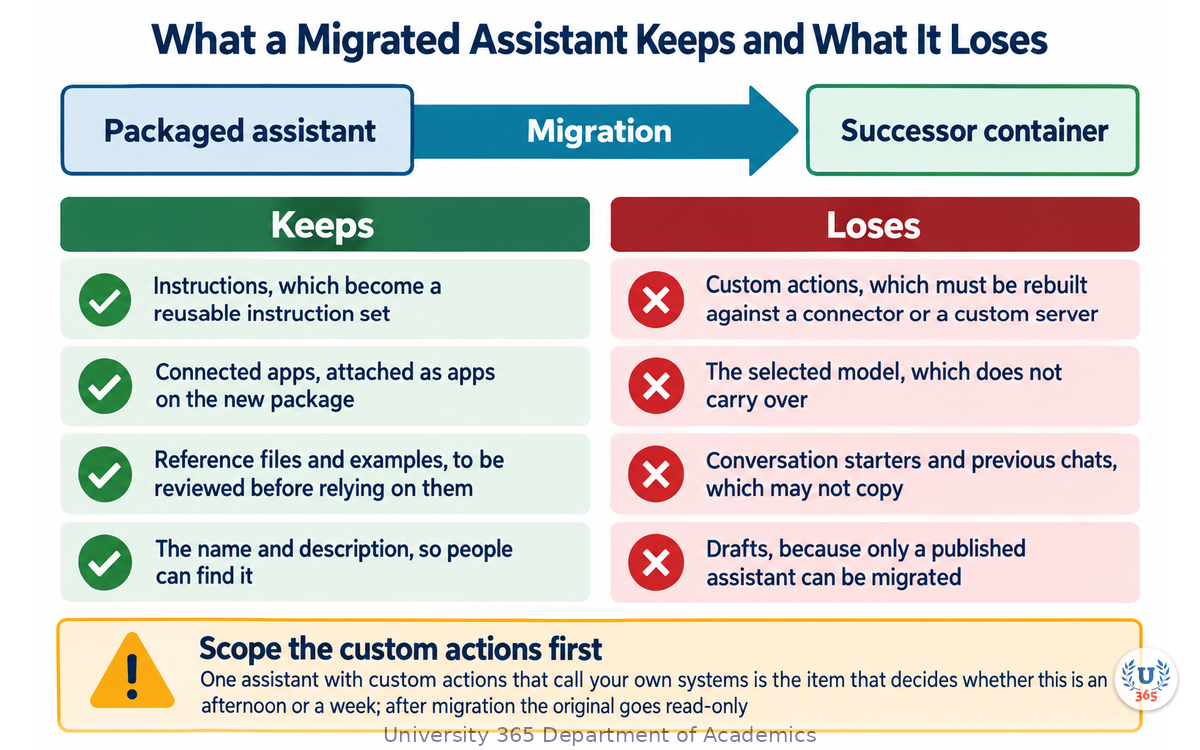
What a Migrated Assistant Keeps, and What It Loses
Migration is not a copy. Knowing what transfers and what does not is what turns an unpleasant surprise into a planned piece of work.
What transfers, according to the vendor's own migration documentation: the instructions, which become a reusable instruction set inside the new container, and the connected apps, which are attached to the new package. Reference files and examples generally move, with a warning to review them before relying on the replacement.
What does not transfer, and this list is the one that costs people time:
Custom actions. If your assistant called your own API, that integration does not come across. It has to be rebuilt against a supported connector or a custom server implementing the Model Context Protocol, and the vendor explicitly warns that a rebuilt integration should not be assumed to provide every capability of the original. This is the expensive item, and it is the one to scope first.
The selected model. The model choice does not carry over. Your assistant may answer differently after migration, and it should be re-tested rather than assumed.
Conversation starters and prior conversation history. These may not be copied. If people rely on a set of suggested prompts, screenshot or record them before the migration.
Draft assistants. Only a published assistant can be migrated.
There is one more thing a migration changes that is not on any list. After migration, the original goes read-only. Your team loses the ability to edit the old object even if they keep using it until retirement. If your process depends on editing the current version, plan the cutover rather than drifting through it.
The honest summary is that migration is roughly an afternoon per assistant for a simple one and a week for one with custom actions. That is a manageable project if it is planned and an unpleasant one if it is discovered in December.
Six Jobs a Packaged Assistant Still Wins
The pattern is not right for everything, and being precise about where it wins is what makes the rest of this lecture usable.
One: a fixed process with a fixed output. A weekly report in your house format, a standard reply to a recurring enquiry, a structured summary of a document type. The process does not change weekly, the output shape is known, and the value comes from everyone getting the same result.
Two: a house style that must not drift. Brand voice, editorial rules, a specific tone for a regulated audience. Encoding the rules once in instructions and reference files is far more reliable than expecting each person to remember them, and it makes the output reviewable against a written standard.
Three: a defined knowledge set that must be the only source. An assistant whose instructions say to answer from the attached policy documents, and to say so when the documents do not cover the question, is a genuine control. Its narrowness is the feature: it cannot wander outside the material you gave it.
Four: onboarding new people. A named assistant with a clear description teaches new team members how the team works with AI, and gives them a safe first task. This is a real and often underestimated benefit.
Five: a first-line filter for a high-volume queue. An assistant that classifies, drafts, or triages a queue of incoming items, with a human approving anything consequential, absorbs a large amount of routine work for a small cost.
Six: a packaged capability handed outside your organisation. If you need to give a defined assistant to partners, students, or customers, the packaged form is the only one that travels by design. This is the one case where the classic public-sharing advantage of the custom assistant remains strongest, and it is worth checking what sharing options the replacement container offers before you assume they match.
Common to all six: the job is repeatable, the output shape is known, and the value comes from consistency rather than from creativity. If your job does not have those properties, the pattern is the wrong tool and something else is better.
When a Packaged Assistant Is the Wrong Tool
Four situations where the assistant pattern fails, and what to do instead.
When the work accumulates. A client engagement, a research project, a long piece of writing: the value is in the history, the files and the evolving decisions. A packaged assistant starts fresh every conversation, so it cannot accumulate anything. Use a persistent workspace instead, where chats, files and instructions live together and stay accessible.
When the job is genuinely one-off. If you will do this task twice, packaging it is overhead. Write a good prompt, save it where you can find it, and move on. Packaging pays off from the fourth or fifth repetition.
When the task needs to act on your systems reliably. An assistant can be given tools, but a system that must run unattended on a schedule, recover from failures, and act across several services is a different object. That is agent territory, with its own design rules around tool reliability, logging and approval gates.
When the input varies wildly. An assistant for a fixed process is reliable. An assistant asked to handle anything a customer might send is not, and the failures will be worst on exactly the inputs that matter. Split the job: an assistant per input class, or a routing step in front of it.
A short diagnostic, then. Ask three questions. Does the work accumulate? Does the task need to act? Does the input vary without limit? Two or more yes answers means the assistant pattern is the wrong container, and the correct next step is usually a workspace or an agent.
How to Write Instructions That Actually Hold
The instructions are the whole specification of an assistant, and most instructions are written as a wish rather than a design. Here is a structure that holds up.
State the role in one sentence. What the assistant is and who it serves. Not a personality; a function.
State the task in one paragraph. What it does, and what it explicitly does not do. The second half is the one people leave out and the one that prevents most unwanted behaviour.
State the inputs it expects. What the reader should provide, in what form, and what it should assume when something is missing. An assistant that knows what to do with an incomplete request is dramatically more usable than one that guesses.
State the output format precisely. Length, structure, headings, whether tables are allowed, what must be included every time. If the output is structured data, give the schema.
State the boundaries. What it must refuse, what it must escalate, and what it must never assert without a source. This is the section that makes an assistant safe to hand to other people.
State the failure behaviour. What should happen when the request falls outside the assistant's knowledge or role: say so, and name the human or process to escalate to. An assistant with a defined failure behaviour is auditable. One without it invents.
State the tone, briefly, and with one example. A single sentence plus one short exemplar does more than four paragraphs of adjectives.
Two rules on top of that structure. First, test the instructions against the awkward request, not the typical one: the vague question, the request with a hidden assumption, the request that is outside scope. Second, keep the instruction set under your own review, in version control if you have it, because an assistant whose instructions nobody can find cannot be audited when its output is questioned.
A useful discipline from the CI-First doctrine: write the instructions as if you were briefing a careful new colleague who will follow them literally. That framing catches the ambiguity that a wish-style instruction hides.
Knowledge Files, and the Limits Nobody Reads
Attaching files feels like giving the assistant knowledge, and in a limited sense it is. The limits are where the surprises live.
There is a file ceiling, and it is not large. Classic custom assistants capped knowledge at a small number of files, historically around ten, and the limit applied for the life of the assistant rather than refreshing. Persistent workspaces allow more, commonly around twenty-five on an individual plan and up to forty on business plans, with a size ceiling per file. Check the current numbers for your plan: these limits change and they decide your design.
Retrieval is by relevance, not by completeness. When the assistant has many files, it retrieves the parts it judges relevant rather than reading everything. That means a document can be attached and never used, and you will not be told.
Conflicting documents produce inconsistent answers. If two attached files disagree, the assistant may follow either one. Resolve conflicts in the source documents before attaching them, rather than expecting the assistant to adjudicate.
Files age silently. An attached policy from eighteen months ago is still there, and may still be retrieved, long after the policy changed. Put an owner and a review date on every attached document, the same as you would for any published material.
Tables and scans extract unevenly. A clean text document extracts well. A dense table in a scanned image may not, and the assistant may answer confidently from a partial extraction.
The practical pattern is a small, curated, current knowledge set, with an explicit instruction that the assistant must say when the answer is not in the attached material. That single sentence turns a knowledge assistant from a plausible one into a reliable one, because it converts invisible failure into a visible message.
Testing an Assistant Before You Give It to Anyone
An assistant that works when you try it is not an assistant that is ready to share. Twenty minutes of testing prevents most of the complaints that would otherwise arrive in the first week.
Test the typical case five times. Run five real requests of the kind the assistant exists for. Read the outputs against the format you specified, not against your general impression. Five is enough to catch format drift, which usually appears by the third.
Test the awkward case five times. The vague question with no context. The request that assumes something false. The request that partly falls outside scope. The request in the wrong language. The request that asks for something the assistant should refuse. These five are where assistants fail, and they are the five nobody tests.
Test the knowledge boundary explicitly. Ask a question that the attached documents do not answer. The correct behaviour is to say so and name the escalation. An assistant that invents an answer here will invent one in production, and you will find out from a customer.
Test it as a second person, not as its author. Hand it to a colleague with no briefing beyond the description, and watch where they get confused. The description and the assistant are one product, and the confusion is a defect in one of them.
Run the same test again after any change. A model update, a new knowledge file, a revised instruction: each one can shift behaviour, and the test set is what catches it. Keep your test requests written down, the same way you would keep a regression set for a model.
Two notes on interpretation. Judge the assistant on its refusals and escalations as carefully as on its answers, because a well-behaved assistant refuses more often than an impressive demo does, and that is a feature. And record the tests and their results somewhere durable, because the person who inherits the assistant needs to know what was checked.
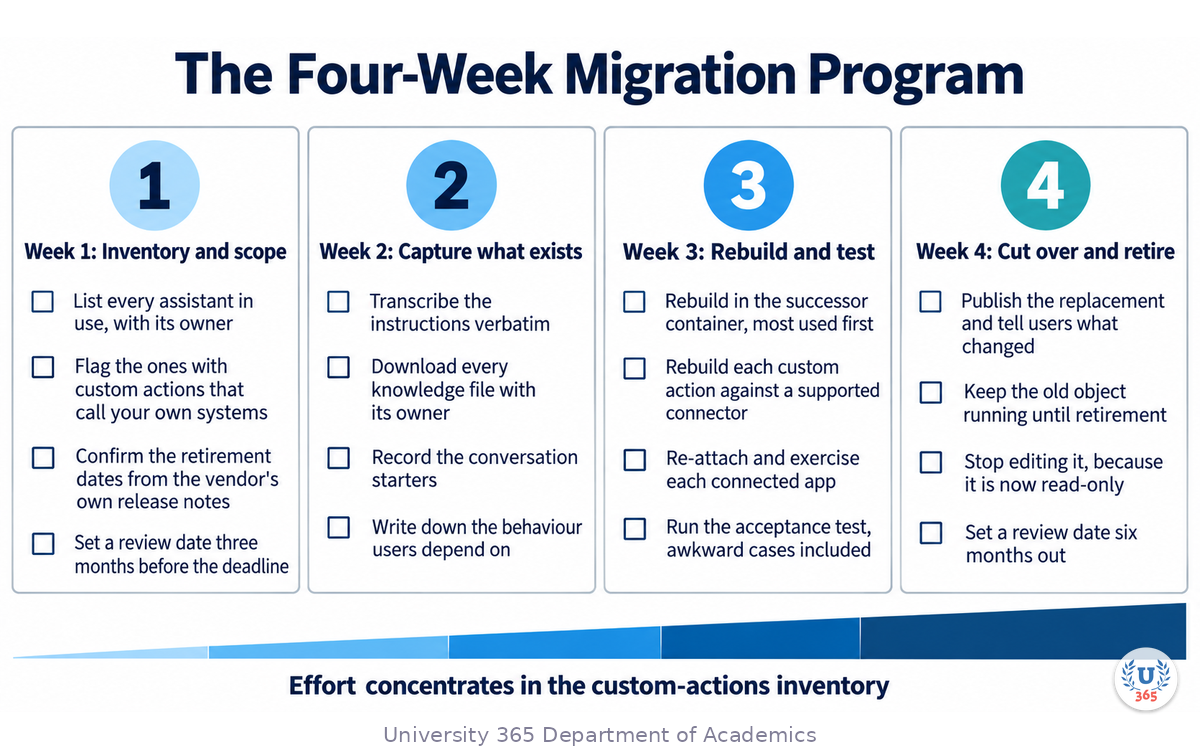
The Migration Checklist
If you maintain a packaged assistant on a platform that is retiring the object, this checklist is the work. It is ordered so the expensive item surfaces first.
Week 1: inventory and scope.
List every assistant in use, with its owner and who uses it. Include the ones nobody mentions; they are the ones that will break silently.
Mark each one by whether it has custom actions that call your own systems. That single flag decides whether the migration is an afternoon or a week.
Confirm the current retirement dates from the vendor's release notes rather than from an article, and put a review date in your calendar three months before.
Week 2: capture what exists.
Export or transcribe the instructions of each assistant verbatim, and store them where the team can find them.
Download every knowledge file, and note its owner and review date.
Record the conversation starters and any prompts people rely on.
Write down the behaviour that your users depend on, in plain language. This becomes your acceptance test.
Week 3: rebuild and test.
Rebuild each assistant in the successor container, in priority order, starting with the ones in daily use.
For each custom action, rebuild the integration against a supported connector or a custom server, and test it against the behaviour you recorded in step 7 rather than against its own documentation.
Re-attach the connected apps and verify each one by exercising it.
Run your acceptance test on the rebuilt object, including the awkward cases and the knowledge boundary.
Week 4: cut over and retire.
Publish the replacement and tell users what changed, particularly anything that no longer works.
Keep the old object running until the scheduled retirement, and stop editing it, because after migration it is read-only.
Set a review date six months out, so a configuration does not quietly become the next thing you discover in a panic.
The whole program is a few weeks for a small team, and the majority of the effort sits in step 2, the custom actions. Finding that out in week one is the entire point of doing the inventory first.
Feynman Summary: Explain It Like You Are 12
Imagine your class has one job that keeps coming back: writing a letter to a local business asking for a donation. Everyone writes a different letter, some good, some not, and your teacher has to fix them all.
So your teacher writes one set of instructions: this is what a good letter says, this is how it opens, this is how it closes, here is the information you always need, and here is what to do if you do not have it. Then your teacher puts those instructions somewhere everyone can reach, attaches the information file, and names it "Donation Letter Helper".
Now everyone uses the same helper, and every letter comes out the same. Nobody has to learn the whole thing from scratch. And when a new student joins, they just open the helper and read what it does.
That is a packaged assistant. One set of instructions, one set of files, one name, given to lots of people, so everyone gets the same result.
But two things to know. First, the helper has no memory. If you ask it something yesterday, it will not remember today. It starts fresh every time, which is actually good, because it means it always behaves the way the instructions say. Second, the company that runs the helper is changing how helpers work. Yours will still work for a while, but at some point you have to copy the instructions, the files and the connections into the new version.
So the instructions are the valuable part. The box they come in is replaceable.
Mindmap: The Complete Picture
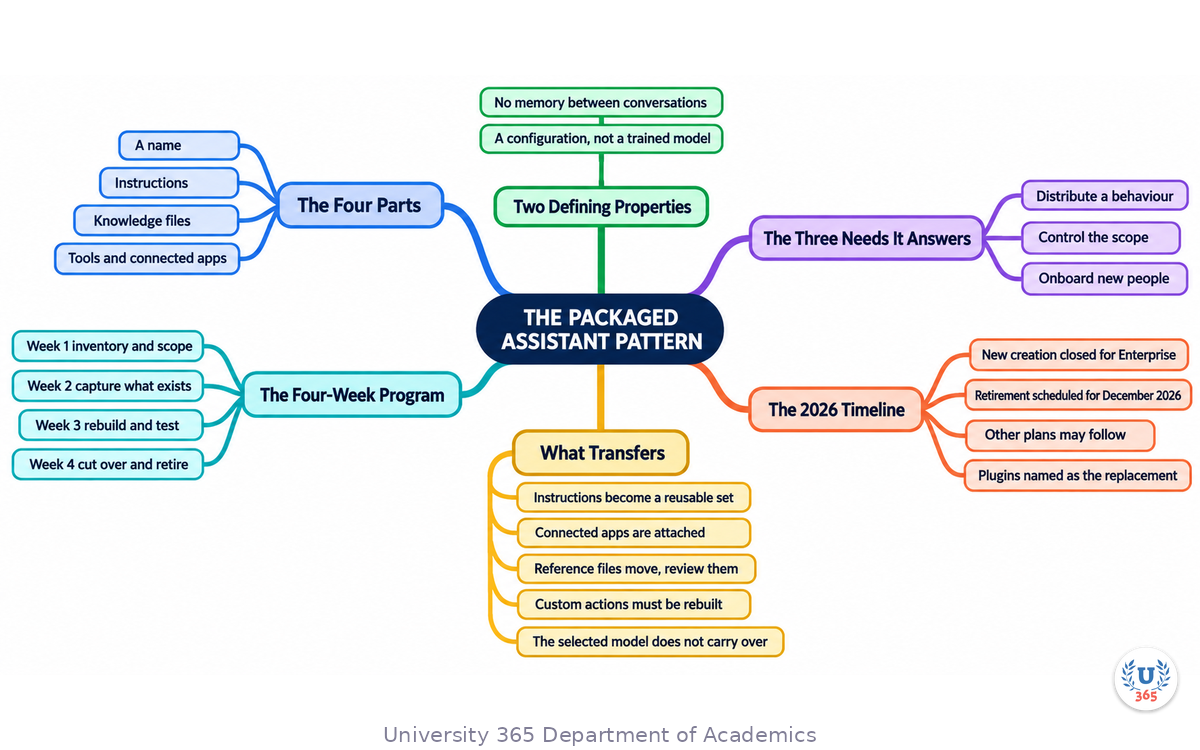
The mindmap centres on the pattern rather than on any product name, because the product name is the part that changes. From the centre, four short branches name the parts: name, instructions, knowledge, tools. A fifth branch records the two defining properties: no memory between conversations, and a configuration rather than a trained model.
The middle ring carries the three needs the pattern keeps answering: distributing a behaviour, controlling scope, and onboarding new people. The outer ring is the 2026 reality, in three parts. The first is the timeline: creation closed for Enterprise, retirement scheduled in December 2026, other plans possibly following. The second is what transfers and what does not: instructions and connected apps move, custom actions and the selected model do not. The third is the four-week migration program, with the custom-actions inventory as its scoping gate.
Read the map as a distinction between what is durable and what is disposable. The four parts and the three needs are durable. The container is disposable, and knowing which is which is what makes a platform change an afternoon's work rather than a crisis.
UNOP Sound (University 365 Neuroscience Oriented Pedagogy)
Take five minutes to consolidate your memory. Play the isochronous tone track (10Hz alpha frequency) with your eyes closed. Alpha-frequency tones after a learning session support consolidation, helping move what you just learned from short-term to long-term memory.
[Audio player: UNOP Post-Lecture Isochrone (10Hz, 5 minutes)]
Practical Exercise: Design and Test a Packaged Assistant
This exercise takes about forty minutes and produces one working, tested packaged assistant. Choose a job you or your team repeat at least weekly.
Part 1: Write the specification (15 minutes)
Use the seven-part instruction structure from this lecture. Write each part on its own line, briefly.
Role. One sentence: what the assistant is and who it serves.
Task. What it does, and explicitly what it does not do.
Inputs. What the reader should provide, and what the assistant assumes when something is missing.
Output format. Length, structure, and what must appear every time.
Boundaries. What it must refuse, what it escalates, and what it never asserts without a source.
Failure behaviour. What it says when the request falls outside its knowledge or role, and who it names as the escalation.
Tone. One sentence, plus one short example of a good output.
Part 2: Attach knowledge and set the boundary (10 minutes)
Choose at most five documents, the smallest set that answers the job. For each, note the owner and a review date. Then add one instruction, worded exactly like this or close to it: answer from the attached material; if the answer is not in it, say so and name the escalation rather than inferring.
Part 3: Test it (15 minutes)
Run the ten tests described in the lecture: five typical, five awkward. For each, note whether the output matched the format you specified and whether it respected the boundary.
Then ask a colleague to use it with no briefing beyond its description, and note where they hesitated.
What to Look For
Did the output format hold on the fifth typical request, or did it drift? Drift means your format specification is not precise enough.
Did the assistant invent an answer when the knowledge did not cover the question? That is the one defect that must be fixed before sharing.
Which of the five awkward tests produced a confident wrong answer rather than a refusal? Confident wrongness is the failure mode worth redesigning for.
Did your colleague understand what the assistant was for from its description alone? If not, fix the description before you fix the instructions.
Did any test make you realise the job is not actually repeatable? If so, this is not the right pattern and a saved prompt is the better answer.
Applied AI Connection
The seven-part specification is the CI-First doctrine written as a configuration. You are setting the standard, the boundaries, and the escalation path in advance, and the assistant operates inside them without ever owning the judgment. When the container changes, as it has done twice in three years, the specification is the asset that survives, and every hour spent on it is recoverable rather than lost.
Glossary
Term | Definition |
Packaged assistant | A reusable configuration of instructions, knowledge files and tools, given a name and shared with a defined group. |
Instructions | The text block that defines an assistant's role, task, constraints, format and boundaries; every conversation starts from it. |
Knowledge files | Reference documents attached to an assistant so it can draw on material beyond its training. |
Connected app | A pre-built integration that gives an assistant access to an external service without custom code. |
Custom action | A builder-defined integration that lets an assistant call a specific external API. Custom actions do not transfer through the current migration path and must be rebuilt. |
Plugin | The successor container named by the vendor, bundling a reusable instruction set together with connected apps. |
Reusable instruction package | A versioned, composable set of instructions that can be shared across several assistants rather than duplicated in each. |
Workspace agent | A shared workflow object inside a managed workspace, able to use connected tools and, where supported, run on a schedule. |
Conversation starters | Suggested opening prompts shown with an assistant. They may not transfer through migration. |
Retrieval | The process by which an assistant selects the relevant parts of its attached material rather than reading all of it. |
File ceiling | The maximum number of knowledge files an assistant or workspace may hold, and whether that limit refreshes. |
Escalation | The defined path a human takes when the assistant says the request is outside its scope. |
Regression test | A written set of requests and expected behaviours, re-run after any change to the assistant or the model behind it. |
MCP | Model Context Protocol, an open standard for connecting models to external tools and data through a common interface. |
CI-First | Co-Intelligence First: the U365 principle that human intelligence orchestrates and AI amplifies. |
5M2S | 5 Minutes to Success: the U365 principle of starting with small, repeatable AI tasks and building from there. |
UNOP | University 365 Neuroscience-Oriented Pedagogy: the pedagogical framework behind all U365 lectures. |
Quiz: TEST YOUR UNDERSTANDING
1. Which property makes a packaged assistant predictable enough to hand to forty people?
A) It begins every conversation fresh from its instructions and knowledge, with no memory carried between conversations
B) It learns from every conversation it has
C) It uses the newest model available at each request
D) It stores each user's previous answers for reuse
2. According to the current vendor migration path, which two items do NOT transfer?
A) Custom actions and the selected model
B) Instructions and connected apps
C) Reference files and examples
D) The assistant's name and description
3. A team has a GPT their staff use daily and the retirement date is three months away. What is the recommended action?
A) Keep using it until the retirement date, inventory the custom actions first, and rebuild in the successor container on a planned schedule
B) Delete it immediately and rebuild from scratch this week
C) Ignore the date because the timeline may move
D) Build a second GPT as a backup
4. Which job is a packaged assistant the WRONG tool for?
A) Work that accumulates over a long engagement, where continuity of chats and files is the point
B) A fixed weekly report in a defined house format
C) A first-line triage assistant for a high-volume queue
D) A defined knowledge set that must be the only source
5. What single instruction converts invisible failure into a visible message in a knowledge assistant?
A) Answer from the attached material, and if the answer is not in it, say so and name the escalation rather than inferring
B) Always answer in a confident tone
C) Prefer the most recent information you know
D) Summarise your sources at the end of every answer
Answers: 1-A, 2-A, 3-A, 4-A, 5-A
Related Resources
U365 INSIDE Publications
From GPTs to Projects: A Strategic Guide for Individuals and Institutions: the companion lecture on the persistent workspace that is the right container when work accumulates.
Mastering the Major AI Models: A Practical Guide: what sits underneath a packaged assistant, and how to read a model card.
How to Pick the Right AI Model Without the Headache: the decision procedure for choosing the model behind an assistant.
Building an AI-First Company Culture: how a fleet of packaged assistants fits into an organisation-wide program.
External Resources
OpenAI platform changelog: the authoritative place to check model and product retirements, including the custom GPT timeline: platform.openai.com
OpenAI API model directory: the current model list, needed when you re-test an assistant after migration: developers.openai.com
Model Context Protocol: the open standard for building the connected tools an assistant uses, and the recommended path for rebuilding a custom action: modelcontextprotocol.io
Stanford AI Index: annual, independent reporting on AI capability and adoption: hai.stanford.edu
Related U365 Lectures
Other lectures in the Business AI Series at UIB, including Automating Business Operations with AI Agents.
The Prompting 101 series, for the prompt structure that belongs inside an assistant's instructions.
U.Copilot for This Lecture
Discuss this lecture with U.Copilot, your AI chat companion trained on this content.
Copy and paste the following prompt into the U.Copilot chat on university-365.com:
You are U.Copilot for Lectures, an AI chat companion specially trained on University 365 lecture content. You are helping a Fellow who just completed the lecture "GPTs Reborn: Why Custom Assistants Matter Again" from the Business AI Series at the U365 Institute of Business (UIB). Your role is to help the Fellow design, test and migrate a packaged assistant. You can: - Walk through the seven-part instruction structure using the Fellow's own job - Explain the four parts of a packaged assistant and which parts survive a platform change - Discuss what transfers and what does not in a migration, and how to scope the custom-actions work - Help the Fellow choose between a packaged assistant, a persistent workspace and an agent - Review a knowledge-file set for conflicts, staleness and the file ceiling - Help build the ten-test set that decides whether an assistant is ready to share Always maintain U365's CI-First approach: the human writes the standard and owns the escalation path; the assistant operates inside boundaries the human set. Use the UP-Context-Engineering Method: provide context-rich, role-aware responses that account for the Fellow's learning level and goals.
Next Steps
Now that you have completed this lecture, here is what to do next:
Write the seven-part specification for one job your team repeats weekly, using the practical exercise.
Run the ten tests, five typical and five awkward, before you share the assistant with anyone.
Add the boundary instruction that makes the assistant say when something is outside its knowledge.
Inventory any assistant you already maintain and flag the ones with custom actions, because that flag decides your migration effort.
Check the current retirement dates in the vendor's release notes and put a review date three months earlier in your calendar.
Join a UIB program if you want structured learning in business management and digital entrepreneurship: visit university-365.com/tuition.
The container will change again. It has changed twice in three years, and each change has been described as the end of the pattern and has instead been a new home for it. What survives every change is the specification: the role, the task, the inputs, the format, the boundaries, the failure behaviour, the tone. Write those well and the migration is an afternoon.
IMPORTANT NOTICE
This lecture is published by University 365 as part of its INSIDE Publications Hub. The content is free to read for all visitors. Lectures in this series may be part of a structured academic program leading to a Micro-Credential for your Career (MCC). To enroll in an academic program, visit university-365.com/tuition.
This content is for educational purposes. While we strive for accuracy, AI is a fast-moving field: product names, features and retirement dates change frequently. Verify the current retirement timeline and feature set against the vendor's own release notes before planning a migration.
Copyright University 365, Inc. All rights reserved. This content is protected under University 365's copyright policies. For permissions or inquiries, contact uda@university-365.com.
Published by the Department of Academics, University 365.
Lecture delivered by the University 365 Institute of Business (UIB).
Denise Cromwell, Dean of Business, UIB
Signed for the academic year 2026.





Comments